KEY TAKEAWAYS
- IT procurement is the whole commercial process behind company technology: the requirement, the supplier, the terms, the purchase, and everything that happens to the asset until it is retired.
- The term covers four things. US federal law puts computers, software, firmware and support services inside one definition of information technology, so a policy written only for SaaS has holes in it.
- The four purchase types behave differently. Hardware, software licences, cloud subscriptions and service contracts each carry their own budget shape and management burden.
- Approval speed is rarely the bottleneck. APQC benchmark data puts the median procure-to-pay cycle for goods at 40 days, while issuing a purchase order takes a median of 2 days.
IT procurement is how an organisation finds, buys and manages the technology its people work with, from laptops and monitors through to software licences, cloud subscriptions and support contracts. Run properly, it is a repeatable sequence with a named owner at every step.
Run badly, it becomes a queue of one-off purchases nobody can audit six months later. This guide covers the definition, the four purchase types, a six-step process, the challenges that break it, the practices that hold it together, and what changes once employees sit in different countries.
What Is IT Procurement?
IT procurement is the process of sourcing, purchasing and managing the hardware, software, cloud services and IT support that a company runs on. It covers the full supplier relationship, from the first written requirement to the day the asset is wiped, resold or scrapped.
Most pages ranking for this term quietly narrow it to software spend. The regulation governing US federal buying does the opposite. The definition of information technology at 48 CFR 2.101 puts computers and peripheral equipment in the same sentence as "software, firmware and similar procedures, services (including support services), and related resources".
Four categories, one definition:
- Hardware. Laptops, desktops, monitors, phones, docking stations, headsets, servers and network equipment.
- Software. Perpetual licences, seat-based subscriptions, and the firmware already sitting inside the devices you own.
- Cloud and infrastructure services. Compute, storage, identity and the platform subscriptions billed by consumption rather than by seat.
- IT services and support. Helpdesk contracts, managed services, configuration work, warranty repairs and device collection.
The same regulation draws a boundary, which stops the term spreading to every powered object in the building. It states that "HVAC (heating, ventilation, and air conditioning) equipment, such as thermostats or temperature control devices, and medical equipment where information technology is integral to its operation, are not information technology".
The split matters operationally: licences and cloud seats are bought with a card and a contract. The hardware half needs addresses, couriers and somebody to receive the box, which is why moving devices to people has grown into a discipline of its own. Companies that hand the work out start there too, and the providers built for this job sell logistics first and software second.
How IT Procurement Differs From General Procurement
General procurement buys things that get consumed. IT procurement buys things that must be configured, connected, patched, recovered and destroyed with evidence. The table shows where the two diverge.
CIPS, the professional body for the discipline, defines the function as "the buying of goods and services that enable an organisation to operate its supply chains, in a profitable and ethical manner". That holds for technology too. What changes is the four rows above, and the fact that a badly bought laptop is still your problem three years later. Teams that want the function designed rather than inherited can bring in help structuring the process before picking a single supplier.
Types of IT Procurement
The four categories in the federal definition are not interchangeable. Each puts money on a different line and asks a different amount of attention.
Hardware Procurement
Buying physical equipment: laptops, screens, phones, peripherals and the occasional server. This is the only type where every unit has a serial number, an owner, a location and a warranty end date, which also makes it the type most likely to go missing. The same model carries a different price in each market, so a single multi-device order still totals differently depending on where it lands.
Software and Licence Procurement
Buying the right to use something: perpetual licences, seat subscriptions and the renewal calendar behind them. Seat counts drift upward as people join and rarely drift back down when they leave, so the bill grows without anyone deciding anything. Renewal dates are the control point, and the audit that matters is a headcount reconciliation.
Cloud and Infrastructure Services
Buying capacity: compute, storage, identity and the platform layer underneath your product. Consumption billing lets spend rise sharply without a purchase order ever being raised, which puts it outside a process built around approvals. Tagging by team and alerting on a threshold beats a policy here.
IT Services and Support
Buying work rather than things: helpdesk cover, managed services, configuration, repairs, collections and disposal. Scope is where this one goes wrong. A loosely worded statement of work turns every exception into a fresh quote, arriving as small invoices nobody totals up.
The four types follow the categories named in the federal definition above, and the budget and effort columns describe what each one costs a team to run rather than to buy. Hardware is heaviest on both counts, and it is where device-level buying and the tooling that tracks it get treated as one purchase when they are two.
The IT Procurement Process
Six steps, in order. The detail changes by company size; the sequence does not, and skipping one shows up two steps later.
Step 1: Define the Requirement
Write down what the person needs to do their job, then turn it into a specification. Ask: which role is this for, which operating system does the team run, what does the security baseline require, and which accessories come as standard? A requirement written per role is reusable, and it turns the next hire into a lookup.
Step 2: Set the Budget and Approve the Spend
Decide who signs, at what value, and how fast. Ask: what is the approval threshold, who approves above it, and what happens when that person is on leave? A named deputy is the difference between a one-day approval and a one-week one.
Step 3: Choose the Supplier and the Country
Pick the market before you pick the vendor. Ask: where will this device be used, is there an authorised reseller there, what is the all-in price including delivery and tax, and can the supplier register the serial number for zero-touch enrolment? A supplier that cannot do the last one forces a manual build later. Comparing suppliers by country coverage is more useful than comparing headline unit prices.
Step 4: Raise the Order and Confirm the Terms
Issue the purchase order, then get a written confirmation back. Ask: what is the promised delivery date, who is the importer of record if a border is involved, what warranty applies in that country, and what happens if the unit arrives faulty? Terms agreed after the money moves are terms you do not have.
Step 5: Configure, Deliver and Accept
Enrol the device before it ships rather than after it lands. Ask: is it registered in Apple Business Manager or Windows Autopilot, is the asset tag recorded, and is the delivery dated against the employee's first day? Registering the serial at the point of purchase is what makes delivery with no manual build possible later. No published industry benchmark exists for how long equipping a new hire should take, which every page quoting a number glosses over, so measure your own.
Step 6: Track, Renew and Retire
The purchase is not finished when the box arrives. Ask: is the asset in the register with an owner and a country, when does the warranty end, who collects it when the person leaves, and what evidence proves the data was destroyed? The eight-practice version of this closing loop, including the three-way match that stops an invoice being paid twice, sits in our best practices for the procurement process.
Pro tip: measure your own cycle before you redesign it. APQC's open benchmark puts the median procure-to-pay cycle for goods at 40 days across 4,112 companies, while the days to issue a purchase order come out at a median of 2 across 1,250 companies. Two days out of forty sit in the step most teams blame first.
So timestamp four moments on your last twenty orders: the date the request was raised, the date the PO went out, the date the supplier confirmed, and the date the employee had a working device. The three gaps between those dates tell you which step to fix. In most teams the widest sits between the PO and the supplier's confirmation, where an order waits on somebody nobody is chasing.
{{cta-primary}}
Common IT Procurement Challenges
Unapproved tools arrive faster than approvals do. Verizon's 2026 Data Breach Investigations Report found that frequent employee use of AI tools "surged from 15% to 45% of employees in a single year", and ranks shadow AI as the third most common non-malicious source of data leakage. Verizon says the report uses 2025 data, so read it as last year's picture.
The fix: make the sanctioned route quicker than the unsanctioned one. A standing catalogue of pre-approved tools, with a named owner who can add to it inside a day, removes most of the reason to go around you.
Your suppliers are part of your attack surface. The same research puts breaches involving a third party at 48% of the total, a rise of 60% year on year. Daniel Lawson, SVP Global Solutions at Verizon Business, said that "the foundational principles of security and strong risk management remain the most effective defense".
The fix: keep a supplier register recording the access each one holds, review it on a schedule, and write removal of that access into the contract exit.
Hardware stops at a border. A laptop sent from head office to an employee abroad becomes an import. Someone has to be named as importer of record, the shipment needs a commodity code, and low-value import rules changed in both the United States and the European Union during 2026, so any duty rate quoted in an article is unsafe to plan against.
The fix: buy inside the country where the person works and the border disappears from the transaction. When a shipment genuinely has to cross one, the Incoterm on the quote decides whether the duty bill lands on your company or on your new hire's doorstep, and choosing between DAP and DDP is what settles it. Packing, labelling and the declaration itself follow a fixed order, written out in sending a laptop across borders.
Devices do not come back. Capterra's 2022 offboarding survey of 287 HR employees found that 71% of them had at least one departing employee keep company equipment such as a laptop or a phone. The same survey put the loss at "$1,963 of equipment, on average", and found hybrid and remote staff 17% more likely to keep kit than fully on-site colleagues. Fieldwork ran in November 2022, so treat it as the shape of the problem rather than this year's number.
The fix: start collection on the day notice is given rather than on the last day, and hold a signed chain of custody per device. A standing collection service for leavers removes the part that depends on goodwill.
IT Procurement Best Practices
Price the Whole Life of the Device
The invoice is the smallest part of what a laptop costs you. Build a total cost of ownership figure from components you can source separately: the purchase price, the administrative cost of raising the order, the collection and storage charges at the end, and the value written off when a unit never returns.
APQC measures that middle piece directly, at "$14 to more than $54 to process a single purchase order". The tail end hides the largest numbers, and structured disposal or selling retired units back recovers part of it. No standards body publishes a total cost of ownership framework for IT hardware, so a figure built from sourced parts beats one borrowed from a model you cannot link to.
Standardise a Build Per Role
Approve three or four configurations, each tied to a job family, with its own image, security baseline and accessory list. Every request then becomes a pick from a short list rather than a specification exercise. It also makes the fleet patchable, because you maintain four builds instead of two hundred variations.
Track a Small Set of KPIs
CIPS describes procurement KPIs as "metrics that can be used to analyse internal and external procurement and supply activities". Two of them are measured externally and you can benchmark against them: procure-to-pay cycle time and days to issue a purchase order, both published by APQC above.
Three more are worth tracking: the share of devices working before the employee's start date, the share collected at offboarding, and the landed cost per device by country. All three are countable from the register you already keep. Treat them as a recommended starting set rather than an industry standard, because no authority publishes an IT-specific KPI list.
Keep One Register Behind the Whole Fleet
Serial number, owner, country, purchase date, warranty end, current state. One record per device, updated by the process rather than by somebody remembering. Spreadsheet registers survive until the first month somebody is on holiday, which is why tracking spread across countries ends up inside lifecycle software instead.
IT Procurement for Global and Distributed Teams
Everything above holds when your people sit in one building. The moment they do not, the physical half of IT procurement changes shape, fastest of all for small teams. "I'm the only IT person, if I'm on holiday, we can't hire" is a line buyers use often enough to be a category of its own.
Three things move. Sourcing splits by country, because the same model carries a different price and lead time in each market. Customs arrives the moment stock crosses a border, adding an importer of record, a commodity code and a rate that can change mid-year. Enrolment has to happen before dispatch, because a new hire in another time zone cannot hand-build a managed device on day one.
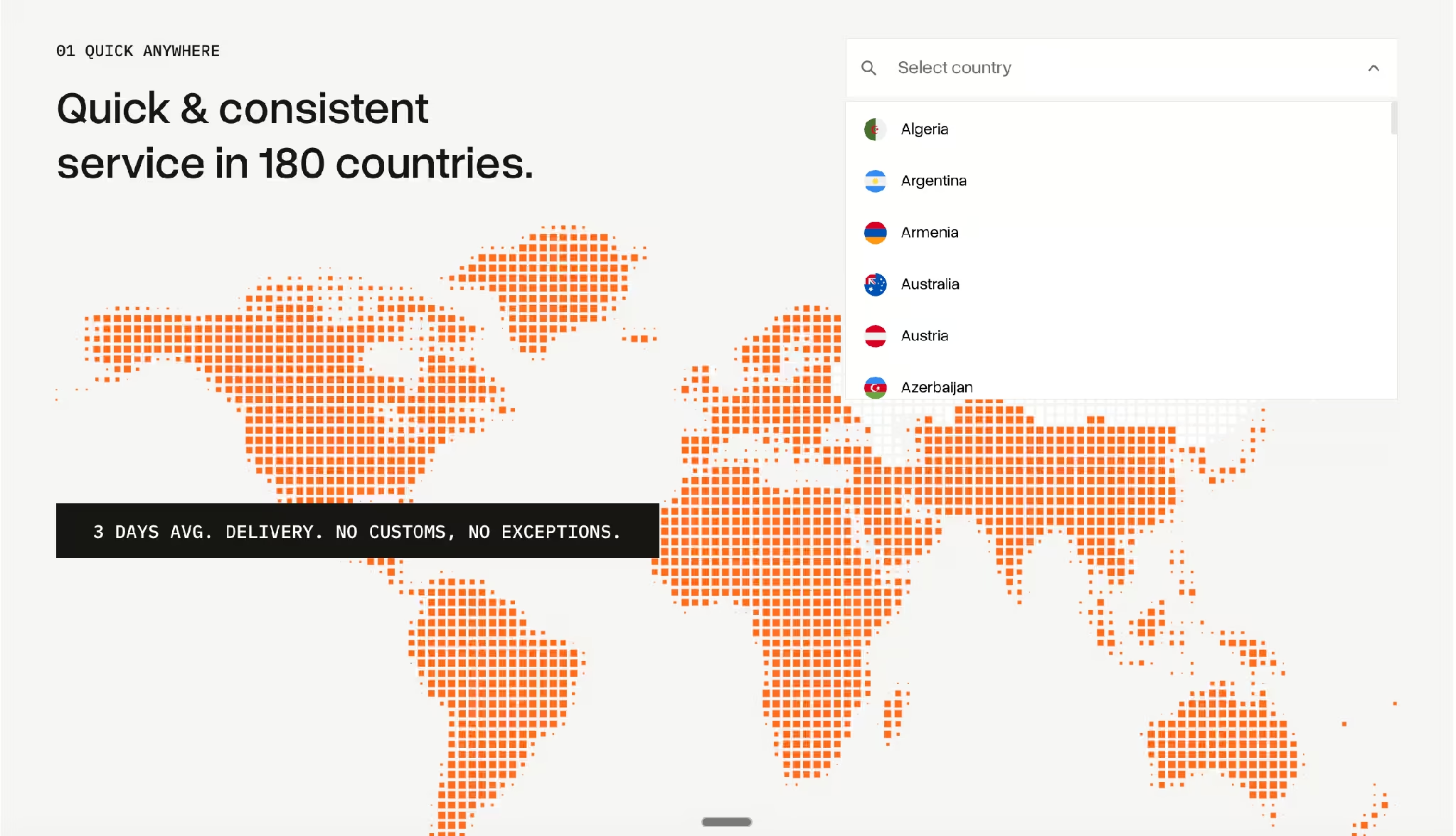
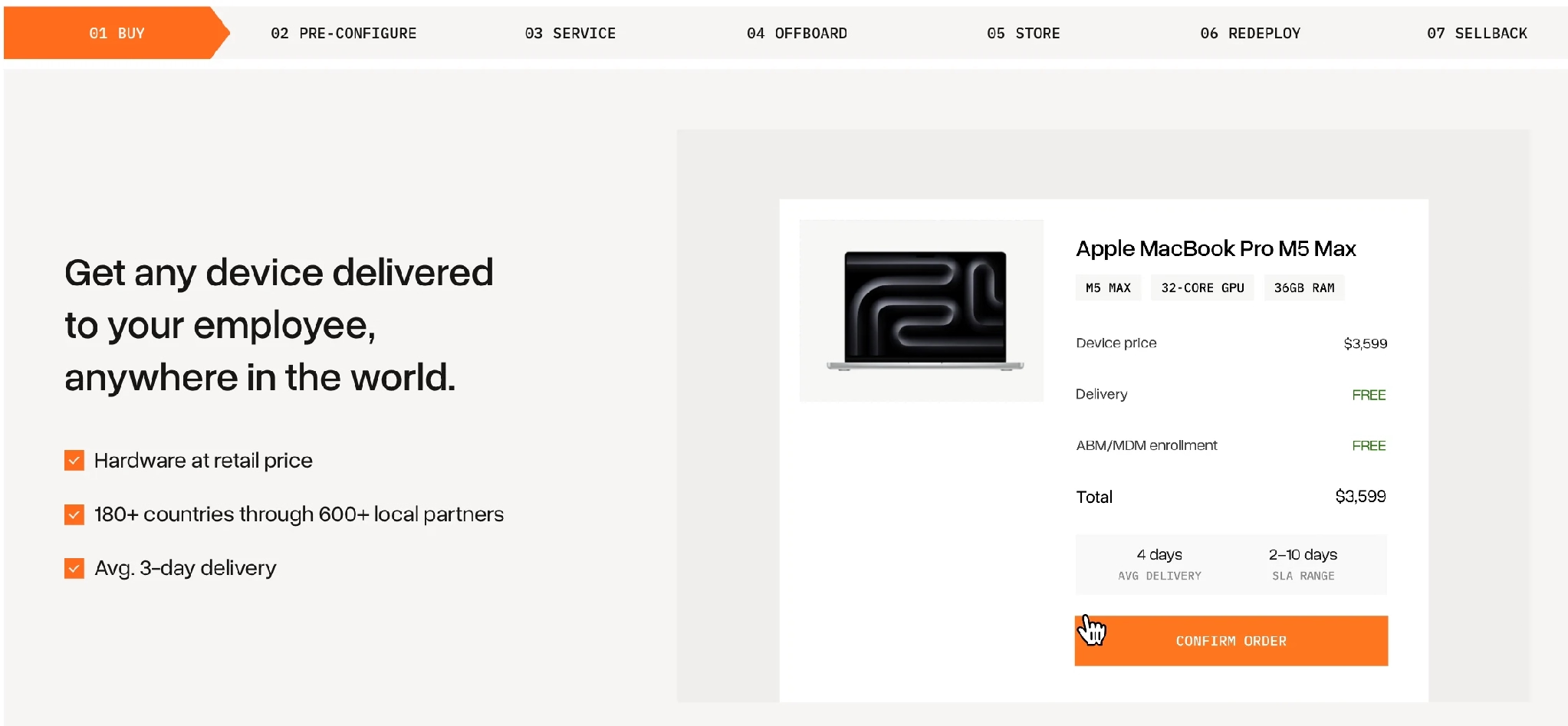
Tequipy exists to hold that physical half. It buys through more than 600 authorised local resellers across over 180 countries, at the manufacturer's recommended retail price rather than a marked-up one, with each device enrolled in Apple Business Manager or Windows Autopilot before it leaves the reseller. Most orders reach the employee inside three working days. The same platform then handles servicing, collection, storage and sellback, including on devices bought somewhere else.
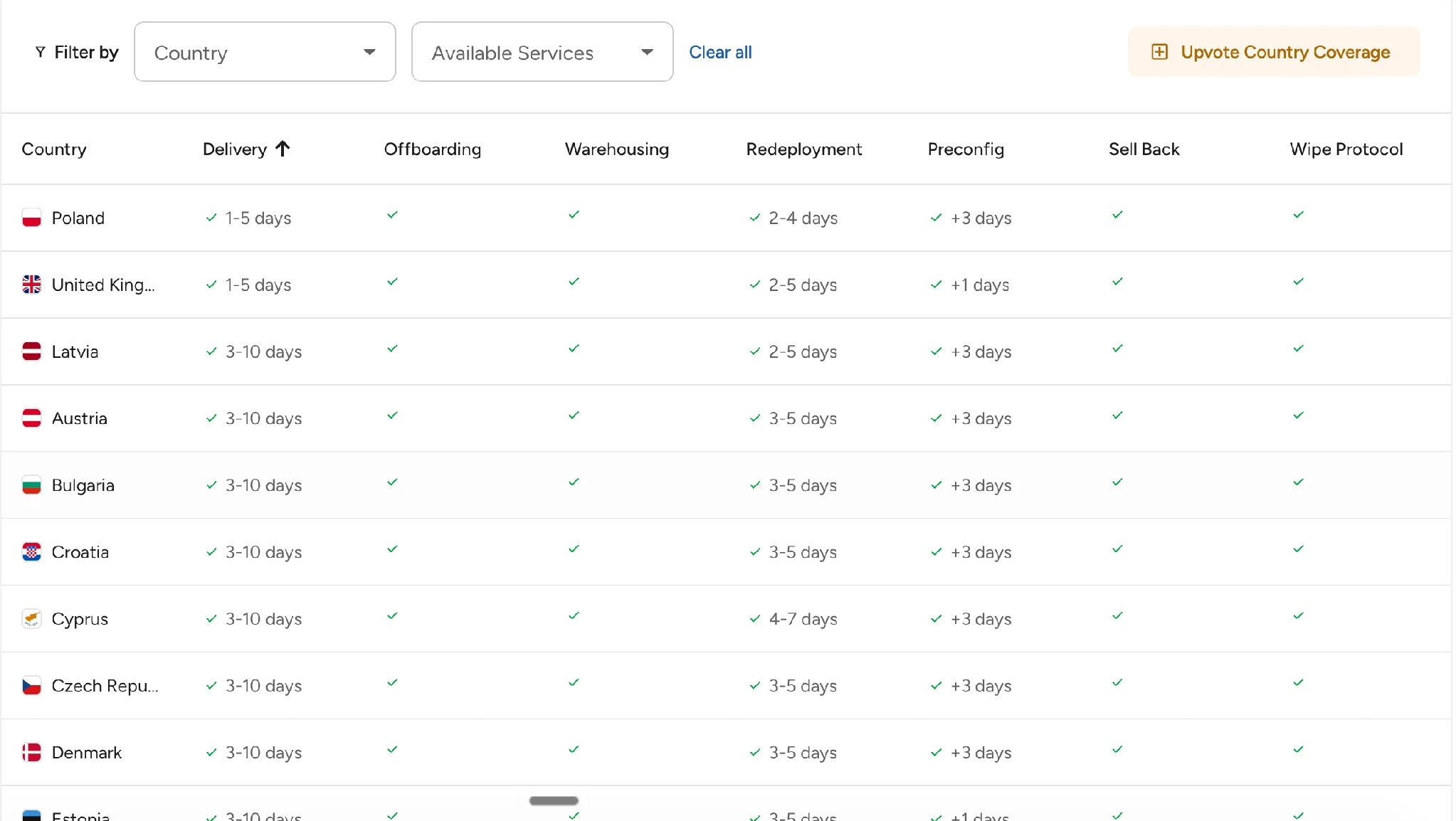
The evidence sits on the customer pages. Booksy's published results show 800+ assets managed, 99% of deliveries before the employee's start date, and 3,200 hours saved on IT administration, around 400 workdays. Gigs hires across 20 countries without a logistics hire. RemoFirst protects nearly $2,000 per employee in equipment that would otherwise be written off. Connecteam had already tried a global vendor before switching, and Australia was where that vendor broke, with deliveries running up to two weeks late.
Equipping a new hire abroad inside a week looks like this. Monday, the request goes in against the approved build for that role and routes to a reseller inside the employee's country, so no border is involved. Tuesday, the serial number is registered for Apple device enrolment or its Windows equivalent.
Thursday, the courier delivers and the employee signs in against your identity provider. Friday, the asset sits in the register with an owner and a location. Teams buying this way across markets run it as one global sourcing arrangement rather than a vendor per country.
{{cta-primary}}
CONCLUSION
Simplify Global IT Procurement With Tequipy
Start with the step that hurts most. If hardware arrives late, fix sourcing and enrolment. If the register is wrong, fix the closing loop. If the bill keeps surprising you, price a whole device life instead of a single invoice.
Tequipy publishes its rates rather than quoting them, so you can read the published rates first. The customer stories show the same process at 100 people and at 500. To test it on a real order, the team takes questions directly.
FAQ
What does an IT procurement do?
IT procurement finds, buys and manages the technology a company runs on. That covers writing the requirement, selecting and contracting suppliers, raising orders, getting equipment configured and delivered, tracking it in a register, and retiring or reselling it at end of life.
What is procurement in the IT industry?
Procurement in the IT industry is the buying and supplier management function for technology. Unlike general purchasing, it continues after delivery, because hardware needs patching, repair, collection and certified data destruction, and licences need renewal and reconciliation.
Who owns IT procurement in a company?
Usually IT, with finance and security attached. IT sets the specification, finance owns the budget and threshold, security signs off on suppliers holding access, and HR triggers the request when someone joins or leaves. Smaller companies collapse all four into one person.
How long should IT procurement take?
There is no published benchmark for equipping a new hire, so set your own target. For goods procurement generally, APQC puts the median procure-to-pay cycle at 40 days, with just 2 days of that spent turning a requisition into a purchase order.
How does IT procurement work when employees are in different countries?
Buy inside each employee's country instead of shipping from a central store, and enrol the device before dispatch. That removes customs from the transaction and gets a managed laptop to the desk faster. Tequipy runs this model across more than 180 countries at recommended retail price.

Keep your current setup.
Just test us on one order.
AUTHOR
Before Tequipy, Tomek ran IT at Revolut, scaling from 100 employees in 2 offices to 5,000 across 17. He built the system that kept every laptop accounted for, then founded Tequipy – a platform that handles IT equipment logistics for distributed teams across 180+ countries.
As CEO, he runs operations and covers the founder layer: strategy, product, and the company-building that comes with both.
15 minutes. Your countries, your devices, your setup. No pitch.
.avif)