KEY TAKEAWAYS
- A free IT inventory template for Excel: one row per laptop, monitor or phone, dropdowns that keep counts clean, and a Summary tab that shows which devices need a look.
- A useful row answers four questions: which device it is (serial number, type, model), who has it, where it is (country and location type) and what state it is in (status, warranty end, date last confirmed).
- Keep it accurate by updating the row whenever someone joins, leaves, sends a device for repair or gets a replacement, and by confirming every row once a quarter.
- A spreadsheet works while one or two people keep it. Several countries, several editors and auditors asking for change history are the signs to move to software.
A new hire starts on Monday, and nobody can say whether a spare laptop sits in storage or which leaver still has one at home. An IT inventory template fixes that: one list of every laptop, monitor and phone your company has handed to its people, with who holds each device, where it is and what state it is in. The free template is right below, then what each column is for, a filled-in example for a 50-person remote team, five setup steps and the signs you have outgrown a spreadsheet.
Free IT Inventory Template
Download the free IT inventory template for Excel
You fill in one tab, and the rest of the file helps you keep it right. Inventory is your list, one row per device. Example shows five finished rows, so you see a complete record before typing your own. Lists holds the dropdown values, and How to use gives the rules in eight lines.
Summary turns each check into a job. A device pending return: open a collection. A device not enrolled in MDM: enrol it, so you can lock it if it goes missing. A row unconfirmed for 90 days: chase the holder. A repeated serial: merge the two rows. A warranty ending within 90 days: book any repair before cover ends. It also counts devices by status and location type, and by country once you type in the countries you track.
These are the 21 columns, in the order they appear in the file.
| Group | Column | What to enter |
|---|---|---|
| Identification | Asset ID | Your own ID, for example LAP-DE-0012 |
| Identification | Device type | Dropdown: Laptop, Desktop, Monitor, Phone, Tablet, Dock, Headset, Keyboard, Mouse, Other |
| Identification | Make and model | Brand and model, for example Apple MacBook Air 13 (M3) |
| Identification | Serial number | The manufacturer's serial. Must never repeat: a duplicate turns red |
| Assignment | Assigned to | Full name of the person who holds the device. Blank if in stock |
| Assignment | Work email or employee ID | The ID your HR system uses, so the row matches HR records |
| Assignment | Department | Team or cost centre |
| Assignment | Date assigned | Date the person received it (yyyy-mm-dd) |
| Location | Country | Dropdown: the country where the device is now |
| Location | Location type | Dropdown: Office, Home, Warehouse, In transit, Repair centre |
| Location | Site or city | Office name or city |
| Status | Status | Dropdown: In stock, Assigned, In transit, In repair, Pending return, Retired |
| Lifecycle and finance | Purchase date | Invoice date (yyyy-mm-dd) |
| Lifecycle and finance | Cost | Price paid, before tax |
| Lifecycle and finance | Currency | Dropdown: the currency of the invoice |
| Lifecycle and finance | Vendor | Who sold it |
| Lifecycle and finance | Warranty end | Last day of cover (yyyy-mm-dd). Turns amber 90 days before |
| Lifecycle and finance | MDM enrolled | Dropdown: Y or N |
| Lifecycle and finance | Planned refresh | When you plan to replace it (yyyy-mm-dd) |
| Lifecycle and finance | Last verified | Last date someone confirmed the row is true (yyyy-mm-dd). Turns amber after 90 days |
| Lifecycle and finance | Notes | Anything else: repair ticket, accessories, condition |
Serial number is the one column that must never repeat. Two rows with the same serial mean one device was entered twice, or two people believe they hold the same laptop, and every Summary count is then wrong. Both serial numbers turn red.
Device type, location type, status and three other columns are dropdowns, because a count only works when everyone spells a value the same way. Excel's data validation, in Microsoft's own description, can "display an error message when a user enters invalid data". In Google Sheets, a value outside the list "is rejected", per Google's dropdown help page.
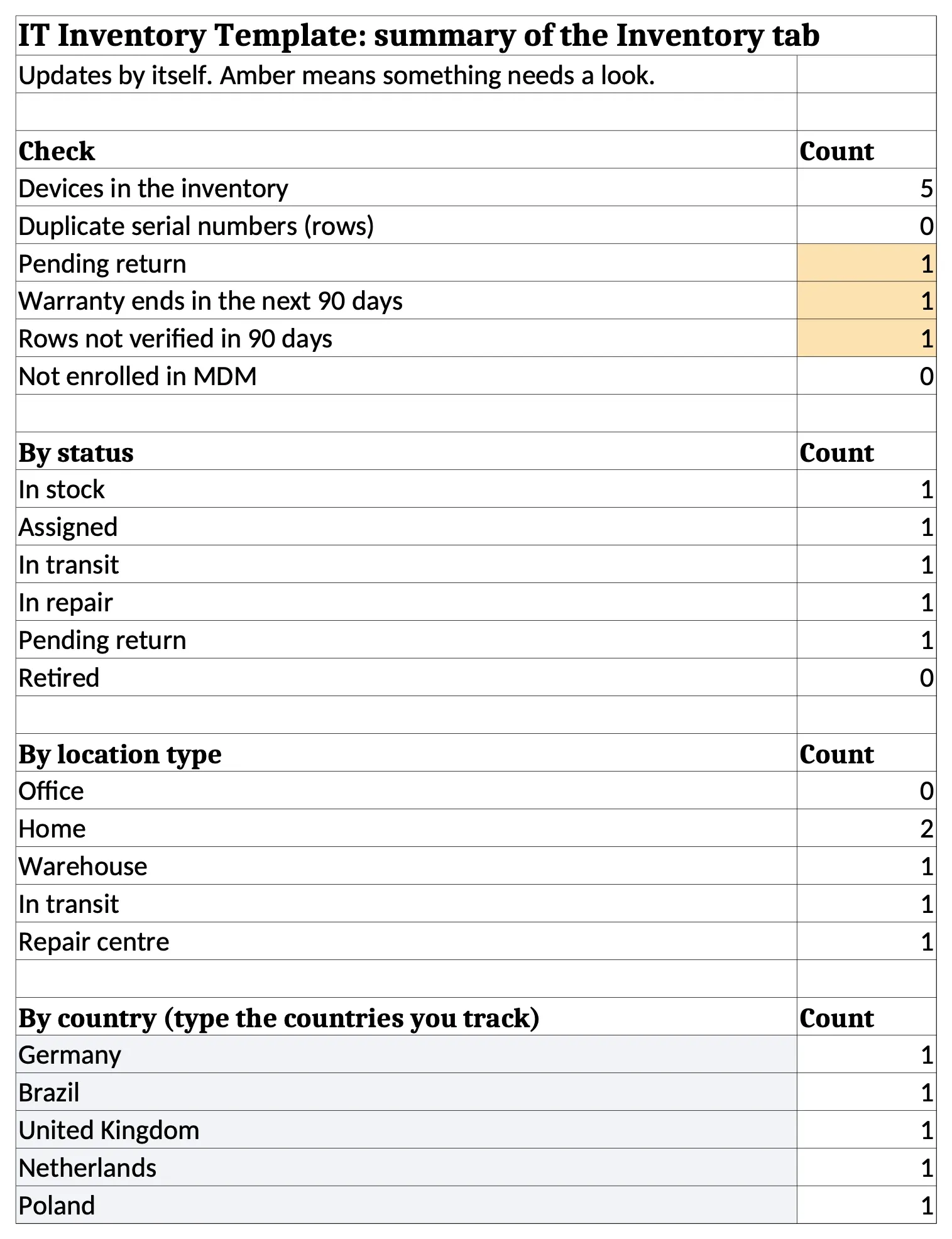
The Summary tab above shows the file after the five example rows were entered: one device pending return, one warranty ending within 90 days and one row nobody has checked for 90 days, each flagged in amber.
What Is an IT Inventory (and What Should It Include)?
An IT inventory, often called an IT asset inventory or a hardware inventory, is a list of every piece of IT hardware a company owns, with who has it, where it is and what state it is in. NIST describes the wider discipline, IT asset management, as the "policies and procedures that an organization uses to track, audit, and monitor the state of its IT assets" in NIST SP 1800-5.
This template covers hardware only. Software licences change on a different rhythm and belong in their own tab or tool.
At minimum, each row should answer four questions about one device:
- Which device is it? Serial number, asset ID, device type, make and model.
- Who has it? The holder's name, their work email or employee ID, and their department.
- Where is it? Country, location type (office, home, warehouse, in transit or repair centre) and city.
- What state is it in? Status, warranty end and the date someone last confirmed the row.
Practitioners land on much the same set. Asked how they track laptops, one sysadmin on Reddit answered: "Figure out what info you need (computer name, type, make, model, SN, user, warranty, replacement date) and it's just entering text."
Both common security frameworks start here. The NIST Cybersecurity Framework 2.0 lists it as ID.AM-01: "Inventories of hardware managed by the organization are maintained". CIS Control 1 covers all end-user devices, "including portable and mobile", connected "physically, virtually, remotely". A laptop on a kitchen table in Lisbon is in scope.
CIS Safeguard 1.1 then names the fields: "the network address (if static), hardware address, machine name, enterprise asset owner, department for each asset, and whether the asset has been approved to connect to the network" (CIS Controls Assessment Specification). The template holds the owner and department; if you report against CIS, add the other four as columns.
IT Inventory Template Columns Explained
Most of the 21 columns explain themselves. These eight are where a hardware inventory most often goes wrong.
| Column | Example value | Why it matters |
|---|---|---|
| Serial number | EX-UK-9P3H57 | Links the row to MDM, warranty and repair records |
| Asset ID | LAP-UK-0007 | Your own name for the device, readable at a glance |
| Work email or employee ID | tom.hughes@example.com | Matches HR records, even when two people share a name |
| Country | United Kingdom | Decides shipping, customs, repair and collection options |
| Location type | Home | Shows how many devices sit outside an office |
| Status | Pending return | Drives every count and every follow-up |
| Warranty end | 2026-01-06 | Tells you whether a fault is a free repair |
| Last verified | 2026-06-15 | Shows how old the row's information is |
Identification Columns
When a laptop breaks, your MDM, the warranty portal and the repair shop each know it by its serial number, so the serial ties the row to every other system. Makers usually print it on a label on the device, and most also show it in the system settings. The asset ID is for people: short enough to read out on a call. Asset tags are optional for remote teams, because a sticker that falls off at home is rarely put back.
Assignment Columns
A list keyed on names breaks the day two people share a name, or someone changes theirs. Add the work email or HR employee ID: it matches your HR record and survives both. Leave the assignment blank for devices in stock, so a spare never looks assigned to its last holder.
Location Columns
When a laptop has to come back or go for repair, the first question is which country it is in. That decides which courier can collect, whether a repair needs a local partner and whether customs paperwork follows. So record the country where the device is today in every row, including for staff at home.
Location type then shows the spread at a glance. A team of 50 with 40 laptops at home and 6 in transit needs a different plan for managing equipment for remote staff from one where every device sits in an office.
Status Columns
Status answers the question people ask most: can this device be used right now? Each value maps to an event. Onboarding moves a device to Assigned, a courier booking to In transit, a fault report to In repair and a resignation to Pending return. A wipe and a check move it back to In stock; a device sold or recycled becomes Retired.
Pick values from the dropdown only. Once one person types "repair" and another "in repair", the filter shows half the devices and the count is wrong.
Lifecycle and Finance Columns
Purchase date, cost and currency let finance match the sheet to invoices paid in euros, pounds and reais. Warranty end and planned refresh let IT budget replacements on a refresh cycle before a laptop dies.
MDM enrolled matters most when a device goes missing: an N is a laptop you cannot lock or erase remotely, so the Summary counts those rows for you to fix first. Last verified tells you which rows to trust. A recent date is evidence; a blank is a guess.
IT Inventory Example: A 50-Person Remote Team
This IT asset inventory example shows five rows from a fictional 50-person team with staff in five European and Latin American countries. The page shows six columns; the Example tab in the file holds all 21.
| Device | Serial number | Country | Location type | Status | Last verified |
|---|---|---|---|---|---|
| MacBook Pro 14 (M4), engineer | EX-DE-7Q2K91 | Germany | Home | Assigned | 2026-09-30 |
| Dell Latitude 5450, new hire | EX-BR-4M8T22 | Brazil | In transit | In transit | 2026-10-15 |
| MacBook Air 13 (M3), leaver | EX-UK-9P3H57 | United Kingdom | Home | Pending return | 2026-06-15 |
| ThinkPad T14 Gen 5, spare | EX-NL-2F6V30 | Netherlands | Warehouse | In stock | 2026-10-01 |
| EliteBook 840 G11, faulty keyboard | EX-PL-8K1D64 | Poland | Repair centre | In repair | 2026-10-08 |
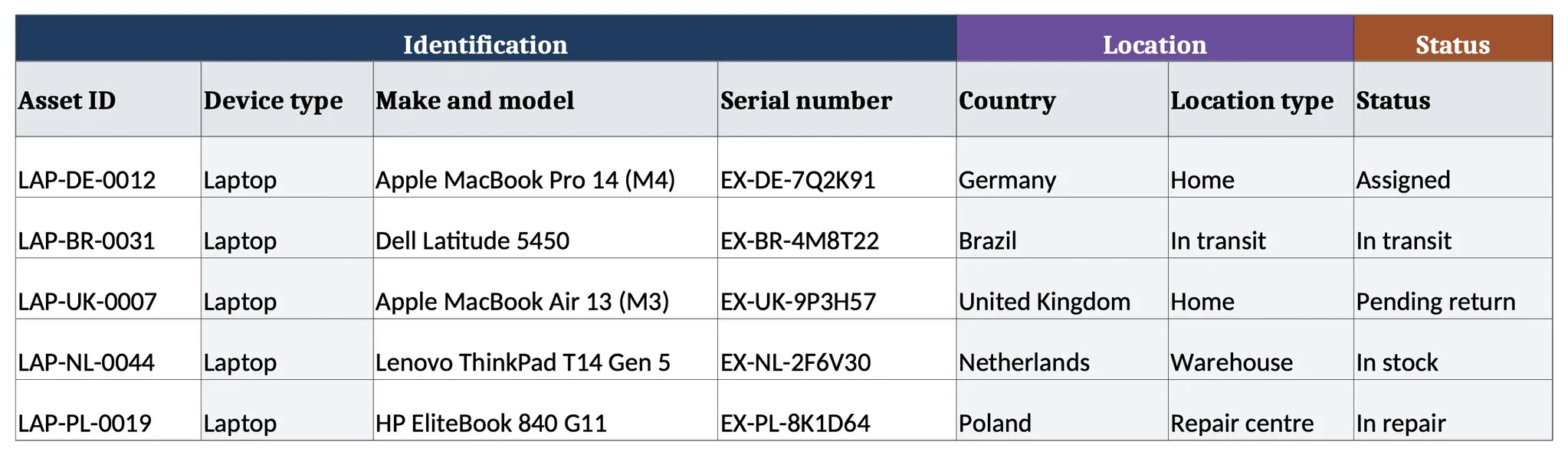
What each row tells IT:
- Germany: the normal case. Assigned, at home, confirmed at the last quarterly check. Nothing to do.
- Brazil: a laptop shipped to a new hire. If the status still reads In transit after the start date, chase the courier.
- United Kingdom: a leaver's laptop still at their home, and the row was last confirmed in June. This row should open a recovery task today, not sit for months.
- Netherlands: a wiped spare in storage. It is the first device to offer the next hire in that country, because redeploying a device you own costs less than ordering a new one.
- Poland: a warranty repair. The notes column records the fault and the loaner, so nobody counts the employee as without a laptop.
Of the HR staff in Capterra's 2022 offboarding survey with a leaver in the past year, 71% reported at least one who kept company equipment. HR staff estimated that each such leaver took $1,963 of equipment, on average. A row marked Pending return with an old verified date is how that money shows up in a spreadsheet.
How to Set Up and Maintain Your IT Inventory in 5 Steps
This is how to manage IT inventory from a standing start, with a few invoices, an MDM console and an HR list that disagree.
Gather What You Already Have
Before typing a row, export three lists: purchase records, the device list from your MDM and the current employee list from HR. MDM gives serials and the signed-in user, invoices give cost and purchase date, HR gives start and leave dates. Where they disagree, such as a device on an invoice that never enrolled, you have found your first problems.
Tip: match the three lists on serial number, never on the employee's name. Invoices, MDM and HR can spell one name three ways, while a serial is the same in all of them.
Set Up the Columns and Dropdowns
Fill the Inventory tab from your three lists, one row per device, picking every dropdown value from its list. To add a missing status or country, follow the How to use tab. Write every date as yyyy-mm-dd: 03/04/2026 means March in New York and April in London.
Collect Data From Remote Employees
CIS's guidance for Safeguard 1.1 explains why it is hard to inventory remote worker hardware: devices "not connected to the organization's network, require manual discovery in order to be included" (CIS Controls Assessment Specification). For a team that works from home, that is most devices.
Send each person one short request: the serial of every device they hold, its condition, and the country it is in today, which may differ from their contract. Ask about monitors and docks too, because an MDM tracks computers and phones, so a monitor or dock usually has no record there. Anyone who does not reply keeps a blank Last verified, so the Summary counts the row until they answer.
Capterra found that hybrid and remote employees were 17% more likely than on-site staff not to return company equipment, so these are the rows to get right first in any remote asset management process.
Pro tip: do not take the serial number the employee types. Compare it with the serial your MDM reports for their account. A mismatch usually means two colleagues swapped laptops, or a personal machine is signed in to a work account.
Tie Every Update to an Event
An inventory goes stale between hires, leavers, repairs and refreshes. Update the row at each of those moments: a new hire's laptop (status Assigned, date assigned, new owner), a leaver (Pending return the day notice is given), a repair (In repair, ticket in Notes) and a refresh (Retired or In stock). Add the spreadsheet update as its own line, with an owner, in your IT onboarding and offboarding checklist.
Verify on a Schedule
Pick a date each quarter and confirm every row, then set Last verified to that day. CIS Safeguard 1.1 asks for a review of the full inventory at least twice a year; a quarterly check catches a leaver's laptop months before that minimum comes round. The Summary tab counts the rows older than 90 days or never verified. Filter Last verified by its amber colour, and filter for blanks, to list them.
When Your Team Has Outgrown an IT Inventory Spreadsheet
Can you use Excel for inventory management? Yes, up to a point. One sysadmin on Reddit put the trade-off plainly: "Microsoft Excel works if you are only a few people managing the doc." A reply in the same thread described where it started to strain: "we've doubled in size in the last year-and-a-half and it's getting to be too much now."
Research on spreadsheets points the same way. Raymond Panko's 1998 review found errors in a few percent of all cells, so a large sheet almost always holds some, and Powell, Baker and Lawson's 2008 review found "it is widely accepted that errors are prevalent in operational spreadsheets".
Buyers who come to Tequipy at this point often say it plainly: "We don't even know how many devices are unaccounted for."
Signs the spreadsheet has stopped being reliable:
- Devices sit in several countries. Each country adds a courier, a repair route and a set of customs rules the sheet cannot hold.
- Several people edit the file. Statuses drift, rows get copied, and nobody knows which version is current.
- Devices are often in transit or in storage. These are the rows that change weekly and the ones most often out of date.
- Auditors ask for change history. A spreadsheet has no locked, per-record audit trail that a SOC 2 or ISO 27001 auditor can rely on.
- HR changes do not reach the sheet. A leaver's laptop stays "Assigned" for weeks because nobody told IT.
The next step is either hardware asset management software that records every change, or a service that also manages each device's lifecycle in person.
Free templates for the rest of the device's life
- To track each device: the IT asset inventory Excel template (Excel), which adds a returns tab for leavers.
- When someone gives notice: the employee offboarding checklist (PDF or Word), 30 steps with an owner and a deadline each.
- After the last working day: the return of company property letter (Word), six letters that ask for the devices back.
- When a device will not be reused: the asset disposal form (PDF, Word or Excel), the signed record that it was wiped and left the business.
- At month end: the fixed asset register template (Excel), with cost, depreciation and book value for each device.
- For the whole process: the IT asset management checklist (PDF), 40 tasks from purchase to disposal.
{{cta-primary}}
CONCLUSION
Keep Your IT Inventory Current Without the Spreadsheet, With Tequipy
Tequipy, built for globally distributed teams, grew out of its co-founder's job as Head of IT at Revolut, where headcount went from 100 to 5,000 and offices from 2 to 17. About 300 people rotated every week, and the fleet lost no laptops.
- One record per device, with its owner, serial number, status, MDM status and warranty. A device Tequipy buys, ships, collects or redeploys in its 180+ countries updates with no row to edit. Existing devices come in by CSV upload.
- Chain of custody on every collection: the sender signs, the courier is certified and the receiving centre signs.
- Proven at fleet scale: Booksy manages 800+ assets through Tequipy.
The device lifecycle management platform costs a flat $99 a month however large the fleet grows, and nothing below 100 devices. An optional HR sync with HiBob, BambooHR or Workday adds joiners and can open collection requests for leavers, at $199 a month, as listed on the pricing page.
Start with the free template above. When the Pending return count keeps growing, upload the sheet to Tequipy as a CSV, and each pickup or delivery Tequipy handles will update its own record.
FAQ
Can You Use Excel for IT Inventory Management?
Yes, for a small fleet that one or two people keep current. Larger, multi-country fleets usually need software that logs every change.
Should You Delete Rows for Retired Devices?
No. Set the status to Retired and keep the row, so anyone can trace what happened to every serial you bought. Filter Retired rows out of daily views.
Who Should Own the IT Inventory?
One named person, with a backup for holidays. Everyone else reports changes to that person instead of editing the file, so statuses stay consistent.
How Do You Track Hardware for Remote Employees?
Manually, unless a system records each move. Ask each person to confirm what they hold once a quarter, or use Tequipy's device platform, which updates when devices ship or return.
What Is the Difference Between an IT Inventory and a Fixed Asset Register?
An IT inventory tracks where devices are and who holds them. A fixed asset register records cost, depreciation and book value for accounting.

Keep your current setup.
Just test us on one order.
AUTHOR
Before Tequipy, Tomek ran IT at Revolut, scaling from 100 employees in 2 offices to 5,000 across 17. He built the system that kept every laptop accounted for, then founded Tequipy – a platform that handles IT equipment logistics for distributed teams across 180+ countries.
As CEO, he runs operations and covers the founder layer: strategy, product, and the company-building that comes with both.
15 minutes. Your countries, your devices, your setup. No pitch.