KEY TAKEAWAYS
- A free IT asset inventory Excel template: one row per laptop, monitor or phone, a returns tab for leavers' devices, and a summary that shows what needs action this week.
- Each row records the asset ID and serial number, type and model, who holds it and where (country and location type), status, warranty end and the date someone last confirmed it.
- Update the row at every hire, leaver, repair and refresh, and open a return row on the day someone gives notice.
- Excel works while one or two people own it. When amber counts keep rising, deleted rows cannot be traced, or late returns cannot be collected, it is time for software or a service.
Who has the laptop that left with last month's leaver, and is it on its way back? This IT asset inventory Excel template answers that for every laptop, monitor and phone your company owns: who holds it, where it is and what happens to it next. Below: the download, what each tab is for, how to fill it in when staff never visit an office, and when to move beyond Excel.
IT Asset Inventory Excel Template
Download the IT asset inventory Excel template
You fill in two tabs, Inventory and Offboarding and Returns; the rest of the workbook checks them. Inventory's 21 columns sit in five groups:
| Group | Columns |
|---|---|
| Identification | Asset ID, Device type, Make and model, Serial number |
| Assignment | Assigned to, Work email or employee ID, Department, Date assigned |
| Location | Country, Location type, Site or city |
| Status | Status |
| Lifecycle and finance | Purchase date, Cost, Currency, Vendor, Warranty end, MDM enrolled, Planned refresh, Last verified, Notes |
Each column earns its place by answering a question someone will ask you:
| Column | What it records | Why it matters |
|---|---|---|
| Asset ID | Your short name for the device | Easy to read out on a call or write on a box |
| Device type | Laptop, monitor, phone and so on | Lets you plan laptops and monitors separately in budgets and returns |
| Make and model | Brand and exact model | Shows which spare suits a new hire and which models age out together |
| Serial number | The maker's serial, the key every other system uses | The one value your MDM, invoices and warranty portal all share |
| Assigned to | Who holds it now | The person you contact when the device breaks or is due back |
| Work email or employee ID | The holder as your HR system knows them | Lets you find the row the day HR reports a leaver |
| Department | Team or cost centre | Tells you whose budget pays for a replacement |
| Date assigned | When the holder received it | Settles how long someone has had a device when it comes back damaged |
| Country | Where the device is today | Sets which courier, repair partner and customs rules apply |
| Location type | Office, home, warehouse, in transit or repair centre | Counts the devices nobody can walk over and check |
| Site or city | Office name or city | Narrows a pickup or a delivery to an address area |
| Status | Where the device is in its life | Splits the fleet into in use, spare, away and due back |
| Purchase date | Invoice date | Answers finance and warranty questions about the device's age |
| Cost | Price paid before tax | Lets finance match the fleet to what was spent |
| Currency | Currency of the invoice | Keeps a separate total per currency, so no total mixes two |
| Vendor | Who sold it | Tells you who to call for a warranty claim or a reorder |
| Warranty end | Last day of cover | Decides whether a fault goes to the maker or costs you a repair |
| MDM enrolled | Whether your MDM manages it | Flags devices you cannot lock or wipe from a distance if lost |
| Planned refresh | When you plan to replace it | Lets you budget replacements before laptops start failing |
| Last verified | Last date someone confirmed the row | Tells you which rows you can still trust, because a device at someone's home is only confirmed when you ask |
| Notes | Repair tickets, accessories, condition | Keeps repair tickets and accessories with the device they belong to |
Status takes six values: In stock, Assigned, In transit, In repair, Pending return and Retired. It and five other columns are dropdowns, so a count never splits over spelling.
The serial number must never repeat: a device entered twice inflates the total and leaves two rows that disagree. The file turns a repeat red with a COUNTIF rule, built with Excel's conditional formatting.
What's Inside This Excel IT Asset Inventory Template
Seven tabs, each with one job. Looking for a hardware inventory template or a computer inventory template? The Inventory tab is that part; the others keep it accurate.
- How to use: the file's rules in 12 lines. Read it once.
- Inventory: the record you look things up in.
- Offboarding and Returns: every device a leaver holds, so nothing walks out unnoticed.
- Summary: what needs action this week.
- Example inventory and Example returns: fictional rows across seven countries. Try the checks here before adding your own data.
- Lists: the dropdown values. Add a country or rename a status here.
Inventory Tab
Open it when someone asks "where is it, and who has it?" The screenshot shows 8 of 21 columns.
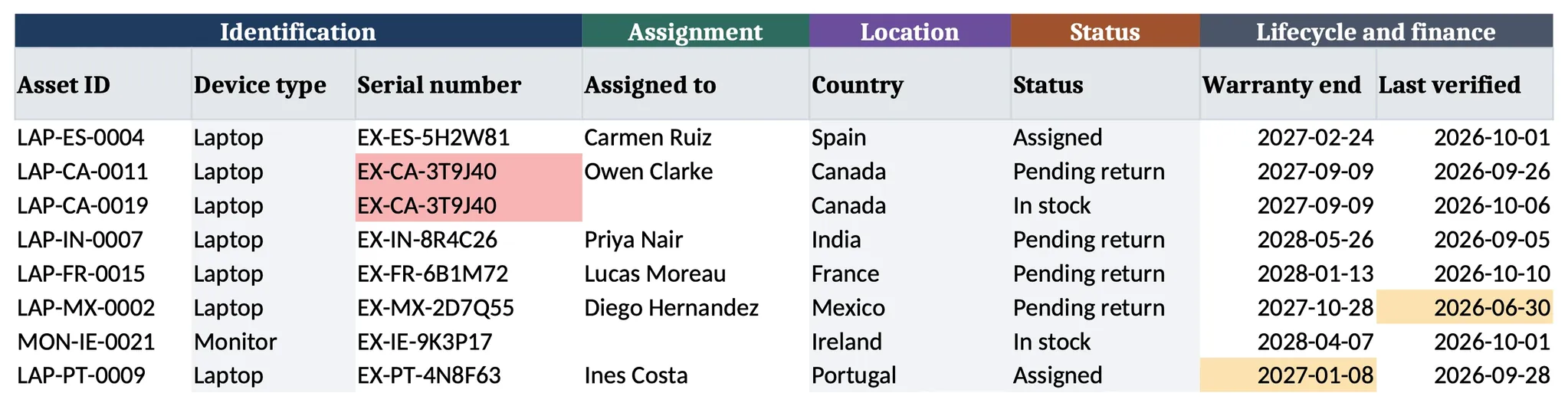
The red pair shows a typical slip: a returned laptop was added again as In stock instead of updating its Pending return row, so one device now appears twice.
Offboarding and Returns Tab
A leaver's laptop is easiest to lose after the last day: nobody is chasing it, and the Inventory still names the leaver. This tab gives each such device a row from the notice date, when the leaver also goes onto your IT onboarding and offboarding checklist, and answers three questions:
- Is it ours? A serial missing from the Inventory shows Not found: a typo or an unrecorded device.
- Is it late? On time, Chase after 14 days, Late after 30. Change both limits on the Summary tab.
- Do the tabs agree? If the Inventory still says Assigned during a return, or Pending return after it, the row says what to update.
Next step records where the device goes: Redeploy, Store, Repair, Sell back or Recycle. The last two need a certified wipe first, through an IT asset disposition provider or your own process. How to use explains the formulas.

Summary Tab
Open Summary once a week: every check above zero turns amber, so it doubles as a to-do list. The leaver check that matters most counts devices marked Pending return with no return row, a leaver nobody is chasing. Cost is totalled per currency.
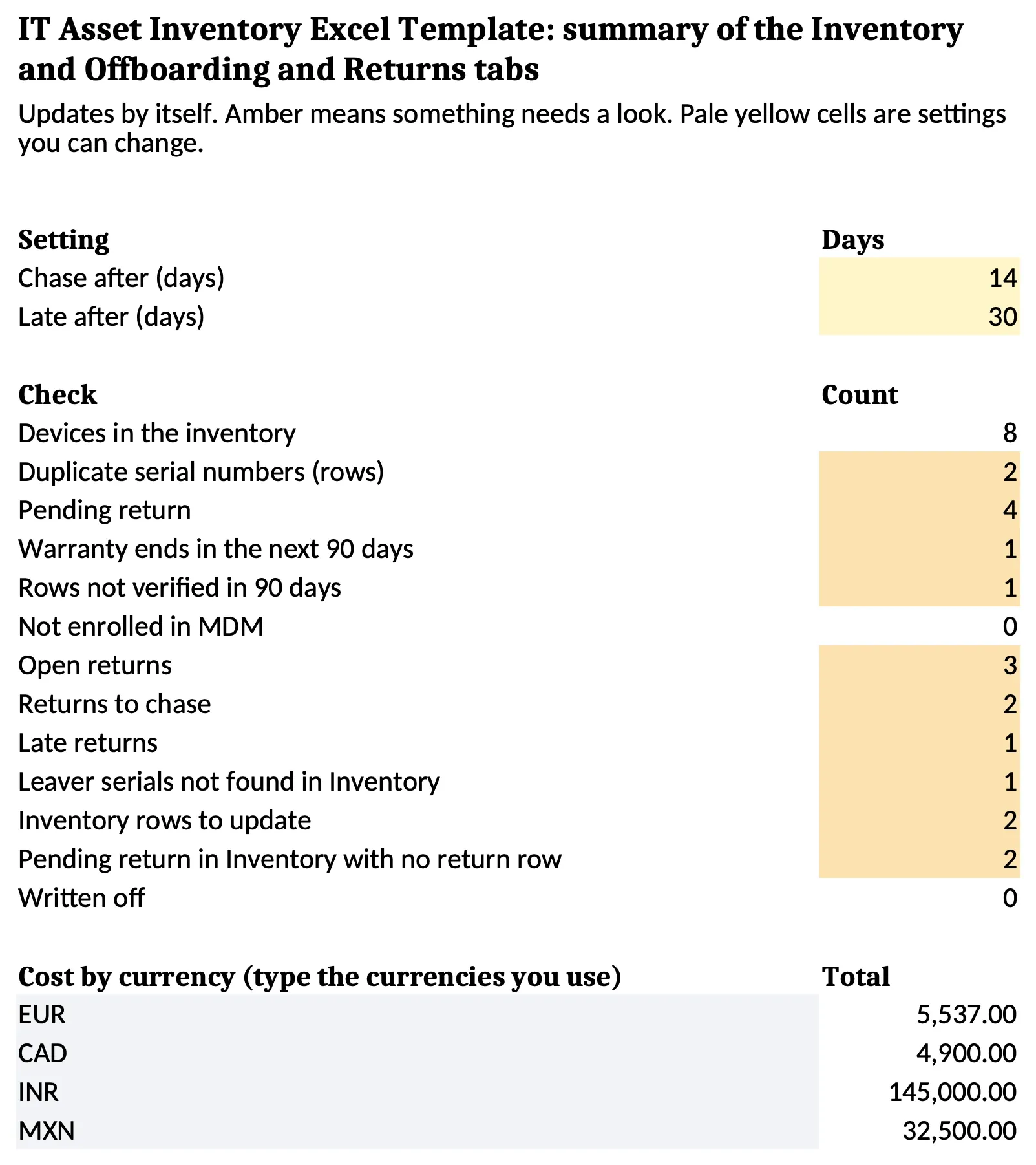
This copy has the example rows entered; the download reads zero until you add devices.
The Formulas and Colour Rules
| Where | Rule | Turns | What it tells you |
|---|---|---|---|
| Inventory, Serial number | COUNTIF($D$3:$D$1002,$D3)>1 | Red | One device is in the sheet twice: merge the rows |
| Inventory, Warranty end | $Q3-TODAY()<=90 | Amber | Book warranty repairs or plan the refresh now |
| Inventory, Last verified | TODAY()-$T3>90 | Amber | Unconfirmed for a quarter: ask the holder |
| Returns, Found in Inventory | $H3="Not found" | Red | Check the serial for a typo, or add the missing device |
| Returns, Return flag | $R3="Chase" / "Late" | Amber / red | Send a reminder, then escalate |
| Returns, Inventory check | $S3<>"OK" | Red | Update the Inventory row so both tabs agree |
Rules are shortened here; the file's versions also skip blank rows.
How to Fill In the Template in 4 Steps
Most data sits in your MDM and invoices. The hard part is what neither covers.
Start From Your MDM Export and Your Invoices
Paste your MDM's device export under the matching Inventory columns, plainly or with Paste Special > Values. Laptops sent through zero-touch deployment are in it from first boot. Purchase date, cost and vendor come from purchase records or reseller invoices.
Check What the Paste Let Through
Microsoft states that data validation works "only when users type data directly in a cell", so pasted values are not checked against the dropdowns. Select the pasted rows and choose Data > Data Validation > Circle Invalid Data. Fix each circled cell from the list, such as "UK" in Country, and get repeated serials on the Summary to zero.
Collect Serials From People Who Never Visit an Office
This is the hard part. The MDM export misses some devices and may name the wrong holder.
For monitors, docks and locally bought laptops, ask the holder to read the serial. On a Mac it is under Apple menu > About This Mac, which "also shows the serial number", per Apple's support page. On many Windows laptops it is on the bottom cover; Dell's guide says it may be "etched directly on the bottom cover or on a sticker". On Dell monitors the label is "at the back of the monitor".
Tip: send one short message, not a form. "Please reply with a photo of the label under your laptop and on the back of your monitor, and the city where they are now. Two minutes, no login." A photo avoids typos; the city fills the location columns.
For enrolled devices, check the person. In Microsoft Intune, the user signed in at enrolment "typically becomes the primary user", per Microsoft's Intune documentation. A laptop IT set up, or one that changed hands, may show the wrong name, so confirm it.
No reply? Send one reminder, then ask their manager, and leave Last verified empty so the row stays amber.
Give Every Device an Asset ID
Pro tip: build the asset ID from device type, country and a zero-padded number, such as LAP-ES-0004 or MON-IE-0021. Never put a person's name in it, because the device will outlive the assignment. Pad the number: sorted as text, LAP-ES-10 lands before LAP-ES-9, while LAP-ES-0009 and LAP-ES-0010 sort in the right order.
Columns That Matter for Remote and Multi-Country Teams
A one-office inventory assumes someone can walk over and look. With staff at home in several countries, the sheet is the only record of where each device is.
Country
A pickup, repair or replacement depends on where the device is, not the country on the contract. Shipping a laptop across a border adds customs paperwork, so the column shows which moves to avoid. The dropdown stops "UK" and "United Kingdom" becoming two countries.
Currency
One cost total across euros, pounds and rupees gives finance a meaningless number. With the currency recorded, the Summary shows one total per currency for finance to convert.
Location Type and Last Verified
You cannot visit a home abroad to see if a laptop is still there. For those devices, Last verified is the only evidence the row is true, so it turns amber after 90 days, and Location type counts how many rows depend on it.
How to Keep Your IT Asset Inventory Accurate
Inventories drift in the quiet weeks after an unrecorded hire, resignation or repair, long before any audit. Tie each event to its cells and let the Summary catch what slips:
| Event | What you change | What catches a miss |
|---|---|---|
| New hire gets a device | Inventory: Assigned to, Date assigned, Status Assigned | Rows not verified in 90 days |
| Someone resigns | Inventory: Status Pending return. Returns: a new row per device | Pending return with no return row |
| Device comes back | Returns: Date received, condition, wipe, next step. Inventory: In stock or In repair | Inventory rows to update |
| Repair | Inventory: Status In repair, ticket in Notes | Location type count for repair centres |
| Retired or sold | Inventory: Status Retired. Returns: Closed | Inventory rows to update |
| Every week | Open the Summary and clear every amber cell | All of the above |
Leavers deserve the most care. Among the 287 HR employees in Capterra's offboarding survey of November 2022, 71% of those with a departure in the previous year reported at least one leaver who kept company equipment. They estimated the equipment each such employee walked away with at $1,963 on average, an HR staff estimate rather than an audited loss. By Capterra's own count, hybrid and remote employees were 17% more likely to keep equipment than on-site staff.
Tip: open the return row on the notice date, not the last day. A notice period of even two weeks is time to send packaging and agree a pickup while the employee still answers your messages.
When to Move Beyond an Excel Inventory
Excel holds up as an IT asset tracking spreadsheet for a modest fleet with a single owner. One r/sysadmin poster at a company with around 300 assets in a spreadsheet said the process was "outdated, slow, and entirely manual". The file itself shows when you have reached that point:
| What you see in the file | What it means |
|---|---|
| Amber counts on the Summary grow every month | More changes than people to make them |
| Nobody can say who changed or deleted a row | The record cannot back up an audit |
| Late returns stay red for weeks | The work is physical, and a sheet cannot do it |
Sign 1: The Amber and Red Cells Stop Clearing
Rising Summary counts mean the fleet changes faster than anyone updates the rows. First give the file one owner and a weekly slot to clear the amber cells. If counts still climb after a month, the workload has outgrown the spreadsheet.
Sign 2: A Deleted Row Leaves No Trace
Another r/sysadmin poster, tracking laptops, docks and phones in a spreadsheet, complained that a device left no record "if someone delete the specific row". Microsoft's Show Changes page says "You can view changes from the past 365 days." Its troubleshooting page adds that edits from a one-time purchase or older Excel are not tracked and clear the Changes pane.
Sign 3: Red Returns Nobody Can Collect
The Returns tab can show that a laptop in Bengaluru is weeks late. Booking a courier there, sending packaging and wiping the device on arrival are IT logistics jobs, and a spreadsheet does none of them. A row that stays red past 30 days needs the steps for recovering equipment from leavers before anyone marks it Written off.
Hardware asset management software fixes signs 1 and 2 with an edit history and shared records. It moves no laptops, so it fits fleets mostly in offices. A laptop retrieval service fixes sign 3 by collecting, checking and storing devices. It keeps no records of its own, so it fits teams with a reliable list already. A platform doing both is covered next.
Free templates for the rest of the device's life
- To track each device in a simpler sheet: the IT inventory template (Excel), one row per device with who holds it and where.
- When someone gives notice: the employee offboarding checklist (PDF or Word), 30 steps with an owner and a deadline each.
- After the last working day: the return of company property letter (Word), six letters that ask for the devices back.
- When a device will not be reused: the asset disposal form (PDF, Word or Excel), the signed record that it was wiped and left the business.
- At month end: the fixed asset register template (Excel), with cost, depreciation and book value for each device.
- For the whole process: the IT asset management checklist (PDF), 40 tasks from purchase to disposal.
{{cta-primary}}
CONCLUSION
Keep Your Device Inventory Current With Tequipy
Not one laptop went missing at Revolut while about 300 people rotated every week. That process was run by Revolut's Head of IT, who later co-founded Tequipy; while he was there, headcount grew from 100 employees in 2 offices to 5,000 across 17. Tequipy runs that returns work for globally distributed teams.
- The Returns tab, done for you. Tequipy contacts the leaver. Packaging and a label are arranged, and a courier Tequipy books collects the device. It is then checked, cleaned and wiped. Handling takes 5 to 10 business days after collection; request to completion usually runs 7 to 21 days, up to 30 if a leaver is slow to reply. Device collection costs $70 to $150 per device, depending on the country, and the optional HR sync can open the request when someone leaves.
- What happens after the return, priced. Storage is $12 per device per month, charged for laptops and monitors. Redeployment to a new hire is $70 to $150. A device sold back returns 20 to 70% of its initial value: closer to 60 to 70% for recent devices in good condition, and about 20% for old or damaged ones.
- Records that follow the service work. A pickup or delivery booked through Tequipy updates that device's entry, with no retyping. Devices imported by CSV, including ones bought elsewhere, change only when Tequipy does a job on them.
- Proof from a distributed fleet. TapTap Send ran three purchasing processes by region before switching, and its case study shows 40+ hours a month saved on IT management.
Tequipy's published prices put the platform at $99 a month flat however large the fleet grows, with no charge while it tracks fewer than 100 devices. The HR sync is an optional $199 a month.
Start with the free template above. If your Returns tab already shows rows you cannot collect, send the Tequipy team the countries they sit in and ask for a price per pickup.
FAQ
Should Each Monitor and Dock Get Its Own Row?
Give a row to anything worth chasing on a leaver's last day, such as a laptop or monitor. A mouse or headset can go in its laptop's Notes cell.
How Many Devices Can an Excel Inventory Hold?
An Excel worksheet holds 1,048,576 rows, per Microsoft's limits page. This template's formulas cover 1,000 devices, rows 3 to 1002; extend the ranges if you need more.
Do You Need to Recover Every Accessory From a Leaver?
Decide per item before the last day and mark what stays as Kept with approval. Through its device lifecycle platform, Tequipy collects laptops and monitors, checks whether a charger is missing, and can book a second pickup.

Keep your current setup.
Just test us on one order.
AUTHOR
Before Tequipy, Tomek ran IT at Revolut, scaling from 100 employees in 2 offices to 5,000 across 17. He built the system that kept every laptop accounted for, then founded Tequipy – a platform that handles IT equipment logistics for distributed teams across 180+ countries.
As CEO, he runs operations and covers the founder layer: strategy, product, and the company-building that comes with both.
15 minutes. Your countries, your devices, your setup. No pitch.