KEY TAKEAWAYS
- Providing laptops to employees is a five-part process: decide who gets what, buy in the employee's country, configure before dispatch, deliver before day one, then manage repair, collection and reuse.
- Company-provided hardware beats a stipend wherever security, support or asset recovery matters, because a device you own can be enrolled, wiped and recovered.
- The two decisions that shape everything else are where the laptop is bought and whether it arrives enrolled. Local purchase removes customs; enrollment at purchase removes IT setup time.
- Tequipy supplies laptops in 180+ countries at recommended retail price with delivery included, enrolled in your MDM before dispatch, averaging 3 business days with every rate published.
Providing laptops to employees is simple in one office and surprisingly hard across ten countries. A machine that takes two days to reach a London flat takes three weeks to clear customs into Brazil, and a new hire with no laptop on Monday costs a day of salary and a bad first week. This guide covers the process, who should receive a company device, the challenges that recur, the practices that work at scale, and the tooling that handles each part.
How to Provide Laptops to Employees in 5 Steps
Step 1: Decide What Each Role Receives
Write down a build per role before anyone orders anything: an engineering build, a sales build, an exec build. Two models cover most companies, with a third for genuine outliers such as data science machines. Every extra model multiplies spares, images and resale variance.
Set refresh cycles per asset class at the same time. Texas DIR life cycle guidance puts laptops at 3 to 4 years against 4 to 5 for desktops, citing expected laptop failure rates of 20% from mobility damage alone.
Step 2: Buy Where the Employee Lives
Sourcing decides delivery time, customs exposure and roughly half the cost. A device bought in the employee's own country never becomes an import, so there is no duty, no paperwork and no unpredictable hold.
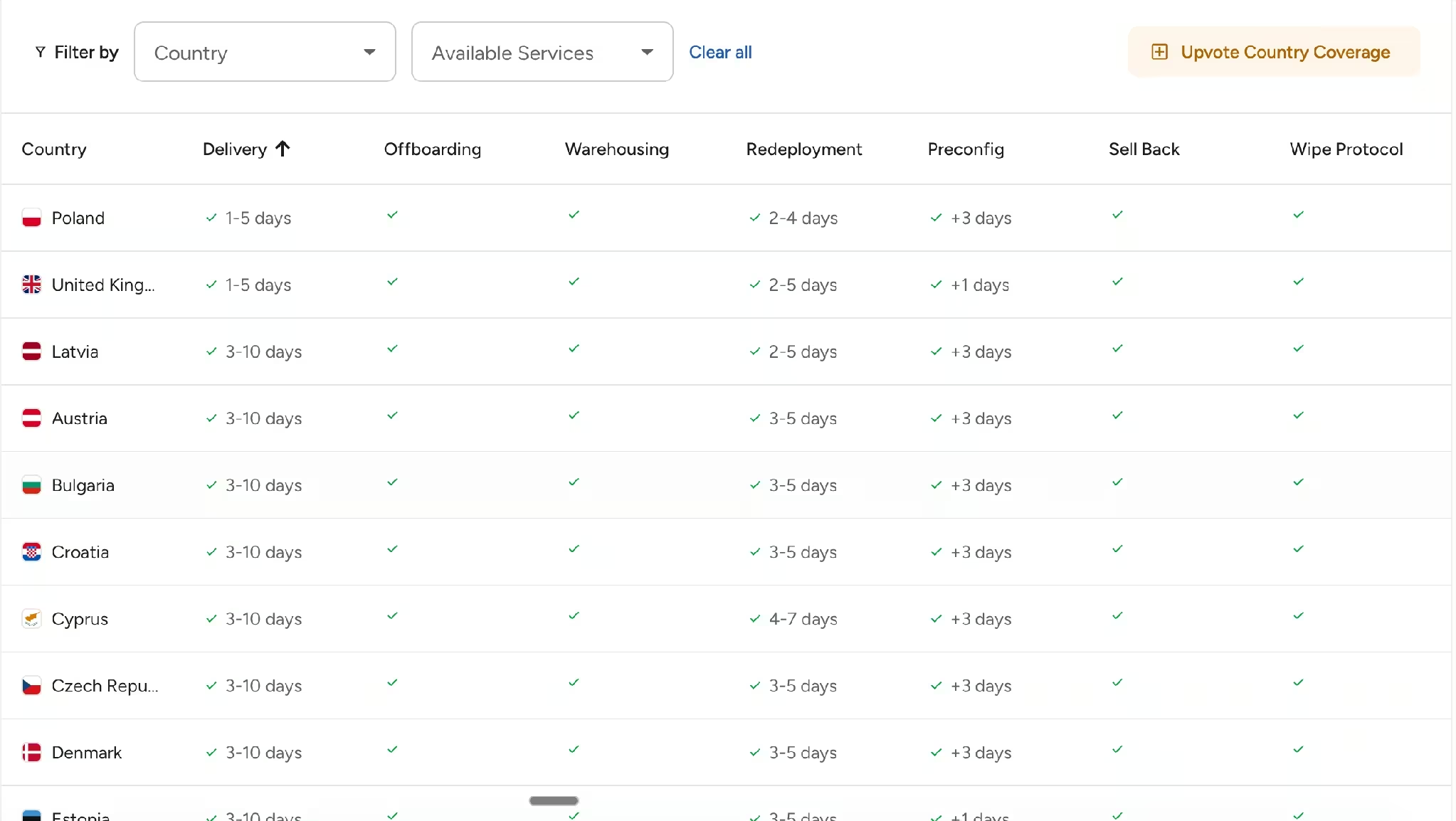
Tequipy's global IT procurement fulfils orders through 600+ authorized resellers across 180+ countries at recommended retail price with delivery included. Delivery averages 3 business days worldwide and is capped at 10, with next-day available across the UK, Europe and the US. Where a delivery does exceed ten days, the device is discounted.
Step 3: Configure Before It Ships
A laptop should arrive managed. Registering each machine in Apple Business Manager or Windows Autopilot before dispatch means it enrolls into your existing MDM on first boot, so zero-touch deployment works with Jamf, Intune, Kandji, Mosyle, Hexnode or JumpCloud without a direct MDM integration. Enrollment is free with a device purchase.
The employee opens the lid, signs in and starts. Nobody images anything by hand, and nobody walks a new hire through setup on their first morning.
See how laptop deployment works without manual setup.
Step 4: Deliver With the Employee Informed
Send tracking to the person receiving the laptop as well as to IT. Someone who knows a courier is coming on Thursday collects the parcel; someone who does not finds a card through the door. Where a delivery is missed, local couriers typically hold parcels at a pickup point for two to three days.
Employees can also order for themselves inside limits you set. Equipment groups define what each role may choose, so a software engineer sees the engineering build and nothing else, and the order still lands in your register.
Step 5: Plan Repair, Collection and Reuse Now, Not Later
The laptop you provide today is the laptop you collect in two years. Repairs need a local path, because shipping a machine to a central office puts an employee out of action for weeks in both directions: average turnaround is around 14 business days even when the process runs well, which is why a replacement device should go out while the repair happens.
Collection needs an owner and a price. Laptop retrieval runs $70 to $150 per device including courier, packaging and basic wipe, storage is $12 per device per month, and redeployment costs the same as offboarding. Anything you will not reuse in that country goes to device buyback at 20 to 70% of initial value. Offboarding, three months of storage and a redeployment together cost $180 to $240, against $1,500 to $2,500 for a replacement machine.
Rates and timings reflect Tequipy's published services.
Should Companies Provide Laptops to Employees?
For most roles, yes, and the reason is control rather than generosity. A company-owned laptop can be enrolled in your MDM, encrypted, patched, remotely locked, wiped to a certificate and recovered when the person leaves. A personal machine bought with a stipend can do none of those things reliably, which turns every offboarding into a negotiation about data.
The exceptions are real. Short-term contractors, seasonal staff and roles where the person genuinely prefers their own setup can work on a stipend, provided access is delivered through browser-based tools and no company data lands on the disk.
Cost is rarely the deciding factor once the whole life is counted. A stipend looks cheaper on the day it is paid and offers nothing at recovery, resale or audit.
Which Employees Should Receive Company Laptops?
- Anyone handling customer or financial data. Encryption, patch state and a certified wipe at exit are not optional in a regulated environment.
- Engineers and anyone needing a specific configuration. High-RAM machines and custom builds cannot be left to a stipend and a local retailer.
- Full-time employees in any country. Consistency of spec and support matters more than the marginal saving of a stipend.
- Anyone whose access cannot be delivered through a browser. Where local tooling is required, the machine has to be managed.
Contractors on short engagements and staff in roles with no data exposure are where a stipend can be defended.
Why Providing Laptops Has Become a Business Priority
Three shifts have moved this from an IT chore to a business process.
Hiring crossed borders. Companies now employ people in countries where they hold no entity and no vendor account, and each new country adds a currency, a tax treatment and a courier network. One IT manager described the accumulated result: "We use Amazon for UAE, a local reseller in India, and a different one in the UK."
Start dates became a metric. A first day without a laptop is visible to the whole team and to the new hire's manager. The measure that reflects it is the share of devices arriving before the start date rather than average delivery time.
Compliance reached the endpoint. SOC 2 and ISO 27001 preparation forces three questions: where every device is, who can access it, and how data is destroyed at disposal. All three depend on how the laptop was provided in the first place.
Common Challenges When Providing Employee Laptops
Challenge 1: Customs and Cross-Border Delay
Shipping a laptop into another country makes it an import, with duty, VAT treatment and paperwork attached. The timeline becomes something you report rather than control, and it is worst in the markets where you have the fewest alternatives.
Challenge 2: Non-Standard Configurations Take Weeks
Local keyboard layouts are straightforward. A US layout in Mexico or a QWERTY board in France is a custom order that can take 3 to 4 weeks, and high-specification builds can take 2 to 3 weeks. A request raised three days before a start date cannot be met at any price.
Challenge 3: The Gap Between HR and IT
HR knows the start date, IT knows the device, and the gap between them is where the failure sits. Someone is signed in Berlin on Monday, IT hears midweek, and the laptop arrives in week two. The fix is a trigger rather than a meeting: Tequipy syncs natively with HiBob, BambooHR and Workday as a $199 a month add-on, so an activation creates the order automatically.
Challenge 4: Nobody Owns Recovery
Delivery has a natural owner because somebody is waiting. Recovery has none. In Capterra's 2022 offboarding survey, "71% say at least one employee didn't return company-owned equipment, like a laptop or smartphone", with an average loss of $1,963 of equipment per non-returning employee, and hybrid or remote staff 17% likelier to keep the kit.
Challenge 5: The Register Stops Matching Reality
Every asset record is accurate the day somebody types it. A sysadmin put the effort in proportion in a June 2026 r/sysadmin thread: "Inventory is one thing, but onboarding, offboarding, returns, repairs, redeployments, and disposal are where we found we were spending most of our time."
Best Practices to Run a Successful Employee Laptop Program
Practice 1: Publish the Policy Before the First Order
Write down which roles get which build, who approves exceptions, what happens on refresh, and what happens at exit. A policy nobody has read still beats a policy that does not exist, because it turns every request into a lookup rather than a negotiation. It is also one of the practical IT procurement process best practices for keeping purchasing consistent.
Practice 2: Take a Signed Equipment Agreement at Onboarding
The agreement lists the assets issued, their value and the return obligation, and where your jurisdiction allows it, authorises a payroll deduction for unreturned property. This is the only control that changes what is available to you legally after someone leaves.
Practice 3: Let Employees Choose Inside Limits
Equipment groups give a new hire a short list of approved options and nothing else. The employee gets a real choice, IT keeps the standard, and the order still lands in the register with a serial number attached.
Practice 4: Buy Ahead for Foreseeable Demand
Refresh dates and most hiring are knowable a quarter ahead. Pre-buying stock for planned starters removes express shipping premiums, and restocking against a threshold keeps the buffer without anyone watching it.
Practice 5: Measure Two Numbers Monthly
Report the share of laptops arriving before the start date, and the count of devices you cannot account for. The first tells you whether the program works. The second is uncomfortable, moves, and forces the handoff conversations no dashboard will.
Pro tip: audit your last twenty laptop deliveries before buying any tooling. Record the date the request was raised, the date the device arrived, and whether it was enrolled on arrival. Two numbers fall out: your real lead time, and the share of deliveries where somebody had to touch the machine afterwards. If that second number is above 20%, enrollment at purchase saves more time than any new dashboard.
A laptop retrieval service can help reduce the second number by giving unreturned equipment a defined recovery process.
Tools and Platforms for Managing Employee Laptop Programs
Three categories of tool touch a laptop program, and only one of them buys anything.
An MDM owns the software state of every enrolled machine: policies, encryption, apps, remote lock and wipe. It cannot buy hardware, ship it or collect it.
An ITAM register records what you own, where it is and when the warranty ends. It documents movements rather than performing them.
A lifecycle platform buys, configures, delivers, repairs, collects, stores, redeploys and resells, and updates the record as each step happens.
Tequipy: Best for Providing Laptops Across Many Countries
Tequipy supplies laptops where employees actually live. Every order is filled by one of 600+ authorized resellers in the employee's own country at recommended retail price, delivery included, averaging 3 business days with a 10-day cap. Devices arrive enrolled in your MDM through ABM or Autopilot at no extra cost, and every later service works on hardware you bought elsewhere too.
Payment terms are part of the answer for a growing company. Card and bank transfer run through Stripe, invoicing is available in EUR, GBP and USD with the currency chosen per order, and a $5,000 credit line gives 7 calendar days to pay after delivery. Tequipy does not lease or finance hardware in any market, so laptops are bought outright and owned.
Three reviews sit on Tequipy's G2 profile in August 2026, averaging 4.8 out of 5. Two come from enterprises above 1,000 employees and one from a mid-market company. An IT lead at an enterprise over 1,000 employees writes that "it really stands out that I don't need to have a local IT department in every country we operate in", naming Colombia and the Philippines (July 2026).
Two limits worth knowing. Tequipy tracks the fleet it manages rather than scanning networks like a general-purpose ITAM tool, so pair it with a register where discovery is the requirement. And SOC 2 is still in progress: ISO 27001 certification and penetration test reports are available today, so ask the team where that certification currently stands if a report is a procurement gate.
{{cta-primary}}
Examples and Case Studies of Successful Employee Laptop Programs
Booksy: Prove the Hardest Market First
Booksy runs 800+ assets across more than 500 employees and chose Latin America as its pilot rather than an easy market. Its case study records 99% of equipment arriving before the employee's start date, and Marcin Szydłowski, Director of Enterprise Technology and Security, explains the choice: "We initially tested them in Latin America, a region where we faced logistical challenges."
Gigs: A Program Instead of a Hire
Gigs provides laptops to 100 employees across roughly 20 countries. At that spread the realistic alternative was a full-time IT logistics hire; the lifecycle went to one provider instead and 100+ hours a month returned to the team. People Operations Specialist Lisa Kiseleva describes the difference in the same case study: "While many vendors say they're global, Tequipy actually delivers."
Connecteam: Fixing the One Country That Broke
Connecteam's previous global provider performed elsewhere and failed in Australia. Its case study covers the switch, and IT Manager Asaf Naor describes the outcome: "Moving to Tequipy saved us in the tens of thousands of dollars compared to contacting sellers every time and paying onboarding fees." Ask any vendor which countries they have delivered in this quarter rather than which appear on a map.
{{cta-primary}}
CONCLUSION
Connect Procurement, Logistics, and Deployment With Tequipy
A laptop program works when buying, configuring, delivering and collecting run as one process with one record. The fastest way to test that is not a vendor evaluation. Take the country that has caused you the most trouble this year, provide one laptop through it end to finish, and compare the landed cost and the arrival date against your current route.
Talk to the Tequipy team about that first order, or price it yourself on the pricing page, which carries the full rate card and a calculator that works out your own numbers in about 30 seconds.
FAQ
Does the company provide laptops to employees?
Most companies do for full-time staff, because a company-owned laptop can be enrolled in an MDM, encrypted, patched, wiped to a certificate and recovered at exit. Stipends for personal machines are usually reserved for short-term contractors and roles with no data exposure.
Which laptop is best for employees?
Whichever two models cover your roles. Standardising on one engineering build and one general build makes spares, imaging and resale predictable, and a third build exists only for genuine outliers such as data science workstations.
How can I get a laptop for work?
Ask whoever runs IT or People Ops for the equipment policy, which should list the build for your role and how to request it. Where a company uses a lifecycle platform, you will usually receive an invitation to choose from a short list of approved options and enter your delivery address.
How often should businesses replace employee laptops?
Every 3 to 4 years for laptops, per published life cycle guidance, against 4 to 5 for desktops. Laptops fail earlier because of mobility damage, so a blanket cycle either replaces desktops too early or runs laptops past their reliable life.
What happens to the laptop when an employee leaves?
It should be collected, condition-checked, wiped to a documented standard, then redeployed, stored or sold. The mechanics of that collection are covered in our guide to remote equipment management. Deciding the destination at collection is what stops recovered machines sitting in a cupboard losing value.

Keep your current setup.
Just test us on one order.
AUTHOR
Before Tequipy, Tomek ran IT at Revolut, scaling from 100 employees in 2 offices to 5,000 across 17. He built the system that kept every laptop accounted for, then founded Tequipy – a platform that handles IT equipment logistics for distributed teams across 180+ countries.
As CEO, he runs operations and covers the founder layer: strategy, product, and the company-building that comes with both.
15 minutes. Your countries, your devices, your setup. No pitch.