
KEY TAKEAWAYS
- Laptop deployment is a five-step process: standardise the build, buy in the employee's country, enroll the machine before it ships, deliver it before day one, and record who holds it.
- Zero-touch setup is the step with the largest return. A laptop registered in Apple Business Manager or Windows Autopilot at purchase configures itself on first boot, so nobody images anything by hand.
- Deployment breaks at scale because each new country adds a vendor, a currency and a customs regime. Buying locally removes the border instead of managing it.
- Tequipy deploys laptops in 180+ countries at recommended retail price, enrolled before dispatch, with delivery averaging 3 business days and every rate published.
A laptop deployment that works is invisible. The new engineer opens the lid on Monday morning, signs in, and starts. A deployment that fails is extremely visible: a first day spent on a personal machine, a customs hold nobody can chase, and an IT lead imaging laptops at 8pm. This guide covers the process step by step, the deployment models available in 2026, what standardisation is worth, and which tools do which part of the job.
Step-by-Step Laptop Deployment Process for IT Companies
Step 1: Standardise the Build Before Anyone Orders
Decide what each role receives and write it down: an engineering build, a sales build, an exec build. Two laptop models cover most companies, with a third for genuine outliers such as data science workstations. Every additional model multiplies spares, images and resale variance.
Then set refresh cycles per asset class rather than one blanket rule. Texas DIR life cycle guidance puts laptops at 3 to 4 years against 4 to 5 for desktops, citing expected laptop failure rates of 20% from mobility damage alone. That one-year difference is why a blanket cycle either replaces desktops too early or runs laptops past their reliable life.
Step 2: Buy in the Employee's Country
Sourcing decides delivery time, customs exposure and roughly half the total cost. Local purchase means an authorized reseller in the employee's own country fulfils the order, so the machine never crosses a border and never meets an import process. This is particularly useful for companies providing laptops to employees across multiple countries.
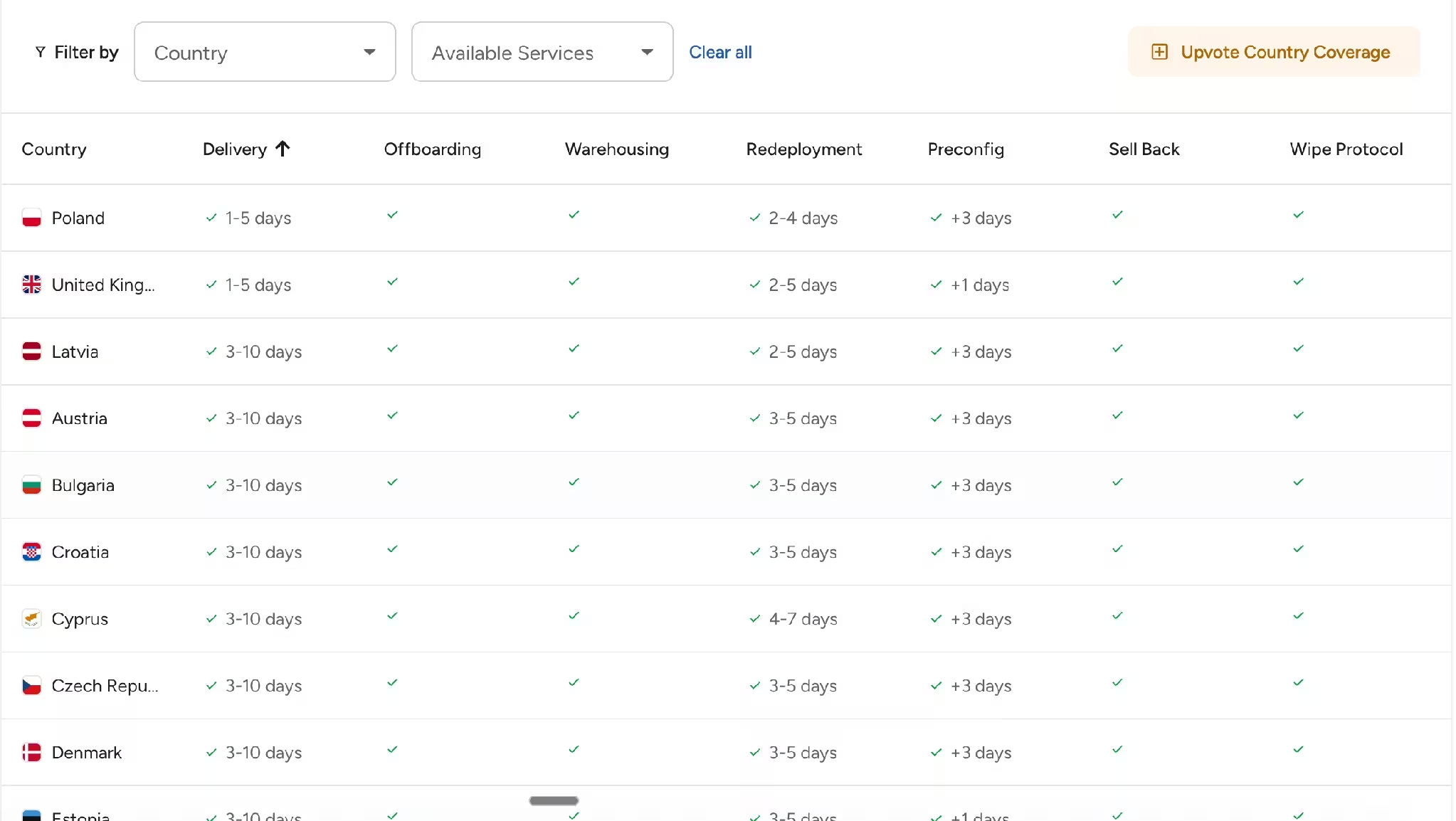
Tequipy's global IT procurement works this way through 600+ authorized resellers across 180+ countries, at recommended retail price with delivery included. Delivery averages 3 business days worldwide and is capped at 10, with next-day available across the UK, Europe and the US. Where a delivery does exceed ten days, the device is discounted.
Step 3: Enroll the Laptop Before It Ships
This is the step that changes deployment economics. Rather than integrating with an MDM directly, each machine is registered in the assignment layer above it: Apple Business Manager through Apple's Device Enrollment Program for Macs, Windows Autopilot for PCs. The laptop then auto-enrolls into your existing MDM on first boot.
Because the flow runs through ABM and Autopilot, zero-touch deployment works with any compatible MDM, including Jamf Pro, Jamf Now, Kandji, Microsoft Intune, Mosyle, Hexnode and JumpCloud. Enrollment is free with a device purchase. In the minority of countries where over-the-air assignment is unavailable, manual pre-configuration is the fallback, quoted before any work begins.
Step 4: Deliver With the Employee in the Loop
Send tracking to the person receiving the laptop, not only to IT. A new hire who knows a courier is coming on Thursday collects the parcel; one who does not know finds a card through the door on Friday. Where a delivery is missed, local couriers hold parcels at pickup points for two to three days depending on the country.
Then confirm arrival against the record: serial number, recipient, date. That entry is what makes repair, collection and redeployment possible later.
Step 5: Keep the Record Alive After Day One
Deployment is the first of several movements. The same laptop will be repaired, collected, stored, redeployed and eventually resold, and each event either updates the asset record or degrades it. Where the party performing the work also writes the record, the register stays accurate without manual entry.
Timings and rates above reflect Tequipy's published services.
Types of Laptop Deployment Models in 2026
One clarification, because the models are easy to confuse on a marketing page: Tequipy does not lease or finance hardware in any market. Laptops are bought outright at recommended retail price and owned by you, and the only payment flexibility is a $5,000 credit line with 7 calendar days to pay after delivery, which behaves like a purchase order rather than financing.
Business Impact of Standardised Laptop Deployment
Benefit 1: New Hires Are Productive on Day One
The measure that matters is the share of laptops arriving before the first morning, not average delivery time. Booksy, with more than 500 employees and 800+ managed assets, runs at 99% on that measure. Every miss costs a day of salary and a bad first impression.
Benefit 2: IT Hours Return to IT Work
Standardised builds plus enrollment at purchase remove the two tasks that consume deployment time: imaging and hand-holding. Gigs, at 100 employees across roughly 20 countries, got back 100+ hours a month across its IT logistics after moving the lifecycle to one provider.
Benefit 3: Costs Become Predictable
Two models and a published rate card make deployment a calculation rather than a negotiation. Consolidation compounds it: TapTap Send merged three separate purchasing processes into one platform and now saves $6,500 a month.
Benefit 4: Redeployment Becomes Realistic
Standardisation is what makes reuse work, because a returned laptop matches the next hire's spec instead of almost matching it. Offboarding, three months of storage and a redeployment together cost $180 to $240, against $1,500 to $2,500 for a new machine. Anything you will not reuse in that country goes to device buyback at 20 to 70% of initial value.
Case Studies and Examples of Successful Laptop Deployment
Booksy: Start With the Hardest Region
Booksy tested Latin America first rather than its easiest market, then expanded. Its case study records 99% of equipment arriving before start dates, and Marcin Szydłowski, Director of Enterprise Technology and Security, explains why the sequence mattered: "We initially tested them in Latin America, a region where we faced logistical challenges."
RemoFirst: Deployment and Recovery as One Loop
RemoFirst, a company of about 250 people hiring in 30 countries, uses a single provider for deliveries, repairs and retrievals. Its case study records every company-issued device recovered and roughly $2,000 per employee protected, in markets including Kazakhstan, Colombia and Ukraine.
Connecteam: One Country Breaking a Global Vendor
Connecteam's previous global provider worked elsewhere and failed in Australia. Its case study covers the switch, and IT Manager Asaf Naor describes what changed: "The attention to detail and the attention to the SLA is really good." Ask any vendor which countries they have delivered in this quarter, because a coverage map states intent rather than performance.
Why Laptop Deployment Becomes an Operational Challenge
Reason 1: Every Country Adds a Vendor Relationship
One IT manager evaluating Tequipy described the arrangement most distributed teams accumulate: "We use Amazon for UAE, a local reseller in India, and a different one in the UK." Five to ten vendor relationships is typical, each with its own pricing, warranty terms and lead times, and none sharing a record with the others.
Reason 2: Manual Configuration Does Not Survive Volume
Imaging by hand works while one person can do it in an afternoon and the machines are in the building. Once laptops ship directly to employees, the options narrow to shipping everything through an office first, which doubles the logistics, or sending unconfigured hardware and walking a new hire through setup on their first morning.
Reason 3: Non-Standard Requests Punish Late Notice
Local keyboard layouts are easy. A US layout in Mexico or a QWERTY board in France is a custom order that can take 3 to 4 weeks, so a request raised three days before a start date cannot be met at any price. The earlier the deployment trigger fires, the more of these are recoverable.
Pro tip: audit your last twenty deployments before changing any tooling. Record the date each request was raised, the date the laptop arrived, and whether it was enrolled on arrival. Two numbers fall out: your real lead time, and the share of deployments where somebody had to touch the machine after it landed. If that second number is above 20%, enrollment at purchase will save more time than any dashboard.
Who Needs Laptop Deployment Solutions?
Globally distributed teams. Where employees sit in countries with no office, deployment is entirely a logistics problem, so local sourcing and doorstep delivery matter more than software features.
Companies hiring in waves. Twenty starters in one month is a different problem from twenty across a year. A deployment triggered from the HR system turns a scramble into a queue that clears itself.
Regulated teams. SOC 2 and ISO 27001 preparation forces documented custody and enrollment evidence, and deployment is where that evidence starts.
Small IT teams supporting non-technical staff. Where the recipient cannot be asked to configure anything, zero-touch enrollment is the difference between a working morning and a ticket.
Companies with high turnover. Deployment and collection are the same capability pointed in opposite directions, and high churn makes both continuous rather than occasional.
Tools and Software IT Teams Need for Scalable Laptop Deployment
Tool 1: A Lifecycle Platform for the Physical Work
Someone has to buy the laptop in the right country, enroll it, ship it, collect it and store it. Tequipy performs those steps and updates the record as each one happens: purchase through 600+ local resellers, ABM or Autopilot registration before dispatch, tracked delivery, laptop retrieval at $70 to $150 per device including courier and wipe, storage at $12 per device per month, and redeployment at $70 to $150.
The platform costs $99 a month flat at any fleet size and nothing under 100 devices, with unlimited admin accounts. Every rate sits on the pricing page besid
e a calculator that prices your own countries and volumes in about 30 seconds, so a comparison needs no sales call.
Tool 2: An MDM for Configuration and Security
Your MDM owns the software state of a laptop: policies, apps, encryption, remote lock and wipe. Jamf, Intune, Kandji, Mosyle, Hexnode and JumpCloud all work through ABM or Autopilot, which means the deployment layer and the MDM layer stay independent. You keep whichever MDM you already run.
An MDM cannot buy hardware, ship it or collect it, which is the boundary worth being explicit about when the two categories get compared.
Tool 3: An HRIS Trigger and an Asset Register
The start date already exists as an event in your HR system, so deployment should hang off it rather than off a ticket. Tequipy syncs natively with HiBob, BambooHR and Workday as a $199 a month add-on, with everything else available through the REST API. The register then holds serial numbers, assignment, warranty dates and location in one place, and the asset side of remote equipment management stops being a spreadsheet nobody trusts.
{{cta-primary}}
Future of Laptop Deployment
Three shifts are visible in buyer conversations this year.
Local purchase is becoming the default. Once a company has watched a new hire's laptop sit in customs, warehouse-and-ship models stop looking cheaper than buying in-country.
Enrollment is moving to the point of sale. Configuring after arrival is increasingly treated as a defect rather than a step, because ABM and Autopilot make it avoidable at purchase.
Finance is asking for per-device cost of ownership. A lump procurement line no longer survives scrutiny, so teams are being asked what a laptop costs across its whole life, including collection and resale value. That question favours vendors who publish rates over vendors who quote.
CONCLUSION
Build a Secure Laptop Deployment Workflow With Tequipy
A secure workflow has four properties: the laptop is bought where the employee lives, it arrives already enrolled in your MDM, the record updates as each step happens, and the same process collects and wipes the machine at the other end.
Tequipy is ISO 27001 certified and penetration tested, devices are wiped to a documented standard at collection with certificates available, and chain of custody is tracked through the platform rather than handled ad hoc. Two limits worth knowing before you shortlist: Tequipy tracks the fleet it manages rather than scanning networks like a general-purpose ITAM tool, and SOC 2 is still in progress, so ask the team where that certification currently stands if a report is a procurement gate.
Three reviews sit on Tequipy's G2 profile in August 2026, averaging 4.8 out of 5. Two come from enterprises above 1,000 employees and one from a mid-market company. An IT lead at an enterprise over 1,000 employees writes that "it really stands out that I don't need to have a local IT department in every country we operate in", naming Colombia and the Philippines (July 2026).
Start with the country that has caused the most trouble this year. One hire, one order, no contract. Talk to the Tequipy team about that first deployment.
FAQ
How do you deploy a laptop?
Standardise the build, buy the machine in the employee's country, register it in Apple Business Manager or Windows Autopilot before it ships, deliver it with tracking sent to the employee, and record the serial number against the person. The laptop then enrolls into your MDM on first boot.
What is computer deployment?
Computer deployment is the process of turning a purchased machine into a working, managed device in someone's hands. It covers configuration, security enrollment, delivery and the asset record, rather than only the purchase.
What does device deployment mean?
Device deployment is the same process applied to any company hardware, including laptops, phones, monitors and peripherals. The steps are identical: standardise, source, configure, deliver, record.
How long does laptop deployment take?
Three business days on average when laptops are bought locally, with ten days as the worst case for remote locations and next-day available in the UK, Europe and the US. Custom keyboard layouts or non-standard configurations can take 3 to 4 weeks.
Can we deploy laptops in a country where we have no entity?
Yes. Local sourcing does not require your company to have a legal entity in the country, because the authorized reseller and the platform handle purchase and delivery. Coverage runs to 180+ countries, excluding Russia, Belarus and North Korea.
Keep your current setup.
Just test us on one order.
AUTHOR
Before Tequipy, Tomek ran IT at Revolut, scaling from 100 employees in 2 offices to 5,000 across 17. He built the system that kept every laptop accounted for, then founded Tequipy – a platform that handles IT equipment logistics for distributed teams across 180+ countries.
As CEO, he runs operations and covers the founder layer: strategy, product, and the company-building that comes with both.
15 minutes. Your countries, your devices, your setup. No pitch.