KEY TAKEAWAYS
- Best overall for globally distributed teams: Tequipy. It gives each laptop a page with its dated history and files, and new laptops arrive from local hardware partners in 180+ countries; when someone leaves, a courier picks the device up for Tequipy to wipe and store. Carrier scans record each delivery and collection, and Tequipy's team records storage and redeployment, so the record stays current.
- InvGate Asset Management and ManageEngine AssetExplorer are the closest like-for-like swaps for GLPI's asset side: discovery, licence tracking and a CMDB (a record of which IT systems depend on which), at published prices. Both sell their service desk as a separate product.
- Snipe-IT is the pick for teams that want to stay open source and free to self-host, with labels and check-in and check-out that GLPI lacks. It has no scanner and no helpdesk.
- Atera, Lansweeper and AssetSonar each cover one need well: Atera for remote monitoring plus tickets per technician, Lansweeper for network discovery, and AssetSonar for per-asset ITAM with an optional service desk.
GLPI 12.0.0 shipped on 7 October 2026, and with it GLPI 10 dropped out of official support, so every self-hosted install still on version 10 faces a major upgrade. That is a natural moment to look at GLPI alternatives. Add backups, plugins and a custody field on every laptop that someone updates by hand, and someone on the team ends up running the tool as well as using it.
Getting laptops back is the other problem. A 2022 Capterra survey asked 287 HR workers about leavers, and 71% had seen at least one walk away with company equipment. A register records that loss; it does not undo it. Below we compare seven options against what GLPI does: who each one is for, what it costs, and where it falls short.
| Tool | Best for | Stand-out feature | Price starting point | Ratings |
|---|---|---|---|---|
| Tequipy | Globally distributed teams that want a simple laptop register and laptops bought, shipped and collected for them | A page per laptop with holder, dated history, files and repairs, plus an employee ordering portal; data in by manual entry, CSV import or REST API; no discovery, licence tracking or CMDB; kept current by Tequipy's team and carrier tracking for laptops it buys, ships and collects | $99 a month flat for 100 or more devices, unlimited devices; free under 100 devices | 4.9 from 4 on G2 |
| InvGate Asset Management | Mid-market IT teams that want discovery and a CMDB at a fixed price | Agentless scans plus agents for Windows, macOS, Linux and Android | $1,499 a year flat, up to 500 IP devices | 4.7 from 11 on G2 |
| ManageEngine AssetExplorer | IT teams that want an on-premises option and per-asset pricing | Discovery, CMDB, licences and purchase orders in every edition | Free up to 50 assets (Cloud); $115 a month for 250 IT assets | 4.2 from 13 on G2 |
| Atera | Internal IT teams and MSPs that need monitoring plus tickets | RMM, patching and helpdesk with unlimited devices | $149 per technician a month, billed yearly | 4.6 from 1,286 on G2 |
| Snipe-IT | Teams that want to stay open source for the asset register | Labels, check-in and check-out, and custom fields, free to self-host | Free self-hosted; hosting from $399.99 a year flat | 4.6 from 27 on G2 |
| Lansweeper | Teams whose main need is network discovery | Agentless scanning plus an IT Agent for remote devices | Free for the first 100 assets; $299 a month, billed annually, for 2,000 assets | 4.4 from 70 on G2 |
| AssetSonar | Teams that want ITAM priced per asset, with an optional service desk | Agent, CMDB graph and many MDM connections | $0.75 per asset a month, billed annually, 100-asset minimum | 4.5 from 90 on G2 |
Prices and ratings were read in November 2026 on each vendor's pricing page and review profile. The six vendors below Tequipy record devices; none of them buys, ships or collects one.
If you mainly use GLPI as a helpdesk, ITSM tools to compare include InvGate Service Management, ManageEngine ServiceDesk Plus, Jira Service Management and Freshservice. This list covers the asset side.
Tequipy: Best for Globally Distributed Teams
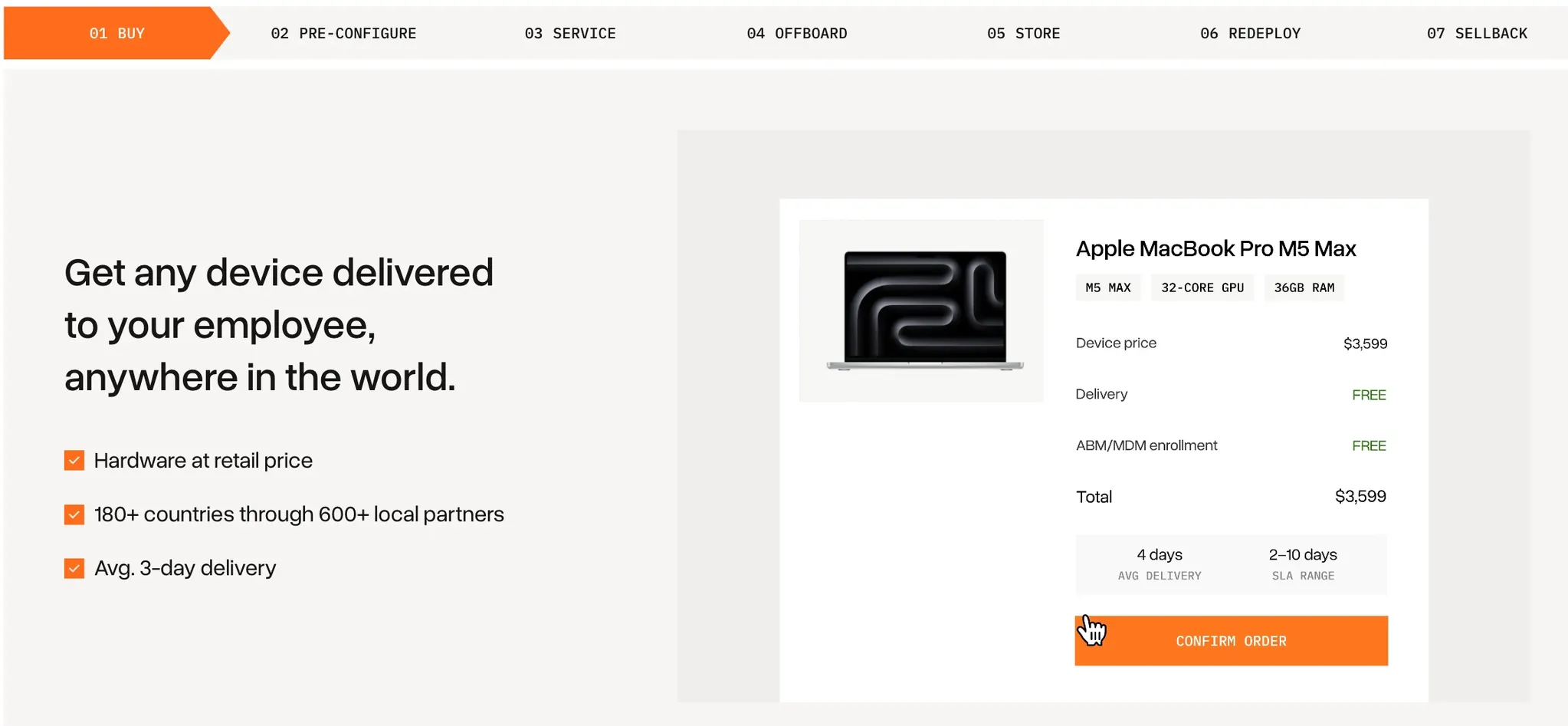
Tequipy has two parts. One is a simple register, with a page for every laptop. The other is everything that happens to those laptops: Tequipy's 600+ local hardware partners source and deliver them in 180+ countries, a courier brings each one back when its owner leaves, and Tequipy's own staff wipe and store it. It does the jobs GLPI only records: buying, shipping, collecting and storing laptops. It has no helpdesk, so if your team runs tickets in GLPI, you keep GLPI or another service desk for that part.
At Revolut, one of Tequipy's co-founders ran IT as the company went from 100 staff to 5,000 in 17 offices, and that is where the model started. GLPI's top complaint is the effort of running it. Tequipy's answer is to remove the typing and the courier booking.
Key Features
Four features matter for a GLPI team. None of them compete with GLPI's CMDB, which Tequipy does not have.
A Device Record Kept Current by Tequipy's Team
Each laptop's page is split into four tabs:
- Details: its status, type, serial number, current holder, specification, estimated value and protection plan (AppleCare+, for example).
- History: dated assignments, with any notes your admins add.
- Files: invoices, warranty papers, manuals and a thumbnail picture.
- Repairs: every repair request, open or closed.
You can tag devices and people to group them. Nothing is deleted: an archived laptop keeps its history, repairs and files. Deliveries and collections update from carrier scans; Tequipy's operations team records storage, redeployment and the condition check.
Moving over is simple. GLPI can export any search to CSV. Send Tequipy that file, up to 500 rows each, and Tequipy's team imports it, usually within 1 to 2 weeks. Laptops you add yourself, by hand or through the REST API, stay as current as the updates you make.
Laptops Bought, Shipped and Collected in 180+ Countries
New laptops come through Tequipy's global laptop procurement: bought in the employee's country at the retail price, shipping included, with MDM enrollment before dispatch, so each one arrives enrolled into the MDM you already run. Delivery takes 3 business days on average.
The GLPI Agent reports where a laptop is. Nothing in GLPI sends anyone to collect it. Tequipy's collection costs $70 to $150 per device, covering the courier pickup and a data wipe, and storage is $12 a month per device. Tequipy's laptop retrieval service handles leavers in countries where you have no office.
Orders, Approvals and Roles in the Tequipy Account
To order, an admin chooses the country, sees the price and the delivery estimate, then follows the order to the door. Equipment groups hold pre-approved devices per team, say engineers and sales. Staff pick from their group in the employee portal, never see a price, and wait for an admin to approve.
The fleet sits in four views (with employees, in your own storage, in Tequipy's warehouse with a view-only stock count, and archived), with search and status filters. Orders, offboardings and the other services each show where they stand; an offboarding alone has 13 statuses. By email, the platform reports on orders, offboardings and requests, sends new hires their invitation, and tells an admin when the HR integration stops working.
A CSV export lists assigned devices (specs left out), and orders, with serial numbers, and requests export as well. The dashboard keeps account-level items in view: actions needed, open orders, payments and the credit line. Access comes in three roles, company admin, finance admin and employee, with no cap on admin seats. Google Workspace, Microsoft Entra ID or Okta handle single sign-on, which an admin can switch to mandatory, and invoices for several entities can sit under one account.
Three Ways to Use Tequipy With Your Current Tools
There are three ways to fit Tequipy in. Use it alone, and its register replaces your spreadsheet while Tequipy's team books the couriers. Run it next to the asset tool you keep, GLPI or any tool in this list: that tool holds discovery, licences and audit reports, and Tequipy buys, ships, collects and stores the laptops.
Through Tequipy's REST API your team can read devices, orders, collections and redeployments and build a scheduled pull into any tool that takes data through its own API or a CSV file. Tequipy sends no webhooks (automatic update messages to other tools), and BlueTally is the only ready-made sync: one way, for devices added after setup.
A third option opens up once your team has stopped relying on an asset tool's deeper features, such as scanning, licence metering or a CMDB. Tequipy's register, covered in the tabs above, can then hold the laptop record. Send a CSV of what you hold today and Tequipy's team loads it. From 100 devices the register is a flat $99 a month, however many you track, and under 100 it costs nothing; a per-asset plan adds to the bill with each device.
Employee data comes in from HiBob, BambooHR, Workday or Rippling for $199 a month: new hires are added automatically, and a Rippling leaver can start an offboarding.
Pricing
| Item | Price |
|---|---|
| Platform | $99 a month flat for 100 or more devices, unlimited devices; free under 100 devices |
| Hardware | Local retail price, no markup, delivery included |
| Collection | $70 to $150 per device |
| Storage | $12 a month per device |
| HR system add-on | $199 a month, optional |
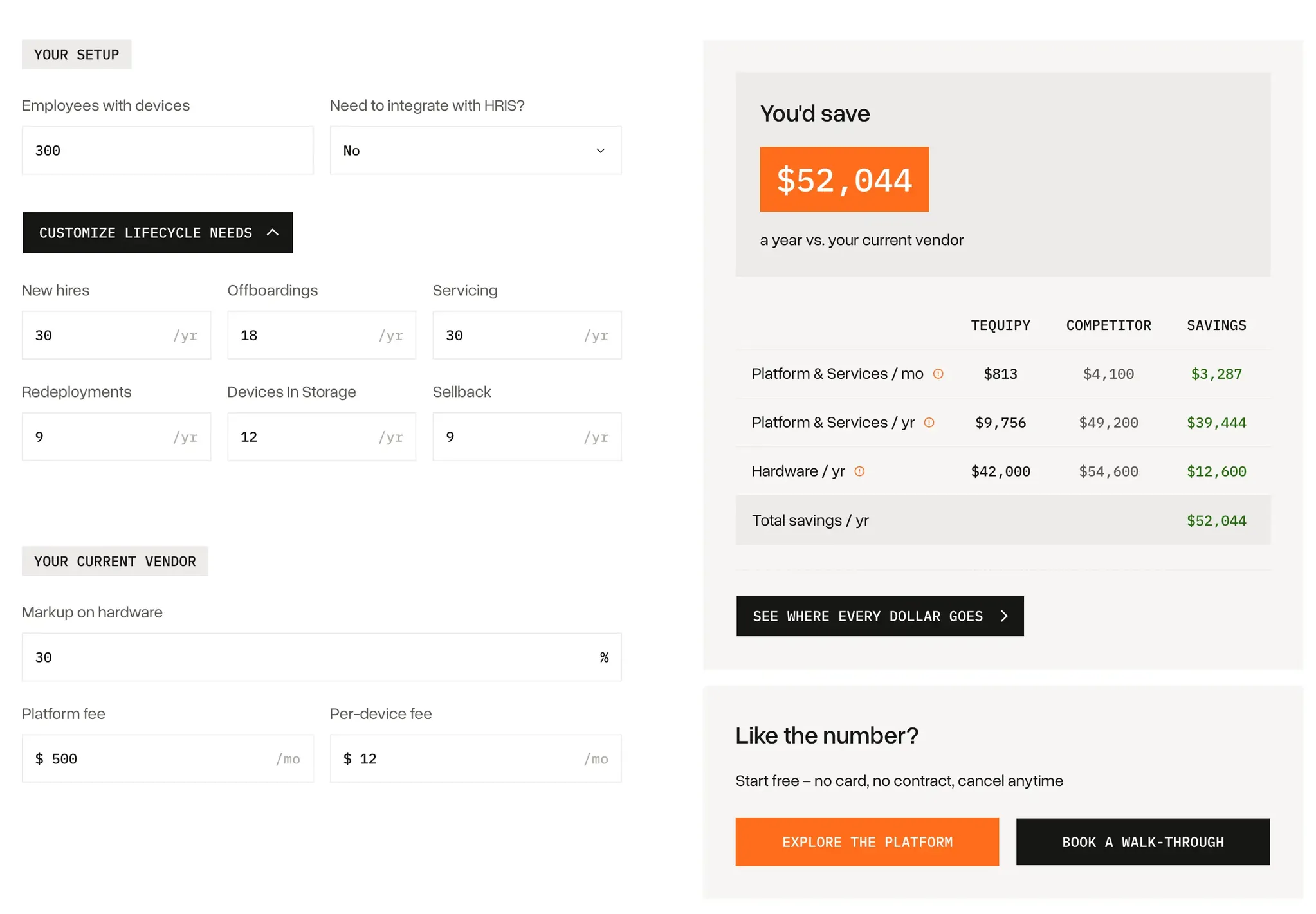
A 100-person team with two IT staff pays nothing for self-hosted GLPI or €456 a year for its cloud. The same team pays $1,499 for InvGate Starter, $3,576 for Atera and $3,588 for Lansweeper Starter, all before services. The Tequipy pricing calculator puts Tequipy at $2,856, including offboardings, servicing, redeployments and storage, but not hardware. The others sell no services, so your team does those jobs.
US computer user support specialists earn a median of about $30 an hour (US Bureau of Labor Statistics, May 2025). At that rate, free GLPI plus your team's time costs more than Tequipy once those jobs take about 8 hours a month. Gigs, a 100-person Tequipy customer, saves 100+ hours a month on IT management, worth about $35,700 a year at that rate. Your team also pays the couriers. The HR integration adds $199 a month. Enter your team size, hires and leavers in the calculator.
Where Tequipy Shines
- Nothing to host or upgrade: no server, patches or major-version upgrades, which is the work GLPI's reviewers complain about most.
- Fewer laptop changes to type in: the pages described above fill in deliveries and storage dates for laptops Tequipy handles.
- Physical work at published prices: buying, shipping and collecting laptops in 180+ countries, with every standard service rate on the pricing page.
Where Tequipy Falls Short
- No helpdesk: no tickets, SLAs or service catalogue.
- A simpler register than GLPI: it records each laptop's holder, history, files and repairs. There is no network discovery, software licence tracking, CMDB or depreciation.
- No labels, mobile app or loaner check-out: there are no custom fields or asset reports either; tags group devices, and Tequipy's team pulls reports on request.
Customer Reviews
Four reviewers on G2 give Tequipy 4.9 out of 5 as of November 2026, which is too few to read much into. Two customers describe the work in their own words.
Gigs, a 100-person company hiring in about 20 countries, saves 100+ hours a month: "They're hands-down one of the most responsive and solution-oriented teams I've worked with." (Gigs case study)
RemoFirst, which handles deliveries, repairs and retrievals with Tequipy across 30 countries: "Their team handles all of this smoothly and stress-free." (RemoFirst case study)
Who Tequipy Is Best For
- IT teams of one to three people: courier scans and Tequipy's team record who holds the laptops Tequipy handles, so nobody on your team updates it after hours.
- Companies with staff in several countries: Tequipy buys at retail price and collects leavers' laptops in 180+ countries, with no contract and no minimum.
- Teams keeping a helpdesk or another register: Tequipy collects, stores and redeploys laptops wherever they were bought. Your helpdesk stays as it is. Device records sit in Tequipy, and your team can pull them into the register you keep through the REST API; BlueTally has a ready-made sync. Start with one test order in your hardest country.
- Not for teams that only need a helpdesk: Tequipy has no tickets.
{{cta-primary}}
InvGate Asset Management

For up to 500 IP devices, InvGate charges a fixed $1,499 a year on its Starter plan (November 2026). It is the closest swap for GLPI's asset half: discovery, a CMDB and licence tracking in a hosted product. InvGate also sells a separate helpdesk, InvGate Service Management, which this section does not cover.
Key Features
InvGate finds devices three ways: agentless network scans, agents for Windows, macOS, Linux and Android, and manual entry. The agent keeps reporting from laptops off the office network. A CMDB maps how assets relate, though automatic mapping needs the Pro plan. Depreciation runs on rules, and warranty dates come from Dell and Lenovo by serial number, with expiry alerts. MDM data from Jamf, Intune and others arrives as a read-only import.
Pricing
| Item | Price |
|---|---|
| Starter | $1,499 a year flat, up to 500 IP devices |
| Pro | $5 per IP device a year, from $2,500 a year (500 to 5,000 IP devices) |
| Enterprise | Custom, from $12,000 a year |
Each IP device includes two non-IP devices, such as monitors, at no extra cost. There is no fee per technician. SSO, the API, licence management and automatic CMDB mapping need Pro; on-premises hosting needs Enterprise.
Where InvGate Shines
- Licence tracking: a G2 reviewer in January 2024 wrote "It has a module for managing licenses and their expirations that is excellent".
- A price you can read: the Starter tier is a fixed yearly fee, not a quote.
Where InvGate Falls Short
- Thin review base: only 11 G2 reviews, 9 of them from reviewers in Latin America.
- Agent rollout takes effort: one G2 reviewer named its "inability to deploy application remotely and the learning curve" as the downside.
Reviews
InvGate scores 4.7 from 11 on G2 and 4.4 from 14 on Capterra, as of November 2026. A Capterra reviewer who also weighed GLPI chose InvGate for "First of all the price and the attractive interface of the product". The same reviewer's complaint: "It does not have customizable dashboards."
Best For
- Mid-market IT teams leaving GLPI's self-hosting: a hosted product with discovery and a CMDB at a fixed yearly price.
ManageEngine AssetExplorer

ManageEngine AssetExplorer charges by the number of IT assets, starting at $115 a month on Cloud or $955 a year on-premises for 250 assets, as of November 2026. Technicians are not counted. It is the GLPI alternative for teams that want to keep their own server but get a vendor behind it.
Key Features
Every edition has the full feature set: network, domain, SNMP (the protocol network devices use to report their details) and agent scans, a CMDB with a relationship map, software licence compliance, purchase orders, four depreciation methods and warranty expiry alerts. Laptops off the network report through the Endpoint Central agent's roaming scan; on Cloud, the agent scan is still in beta. Loans run through check-in and check-out, and a mobile app scans barcodes and QR codes. ManageEngine sells its helpdesk, ServiceDesk Plus, as a separate product.
Pricing
| Item | Price |
|---|---|
| Free edition | 50 assets on Cloud, 25 on-premises |
| Cloud, 250 IT assets | $115 a month or $1,245 a year |
| Cloud, 1,000 IT assets | $360 a month or $3,895 a year |
| On-premises, 250 IT assets | $955 a year |
| On-premises, 1,000 IT assets | $2,995 a year |
A 30-day trial covers up to 250 assets. Remote control on Cloud is an add-on at $315 per concurrent session a year.
Where ManageEngine AssetExplorer Shines
- No technician count: an April 2026 G2 review notes that "if you have 100 technicians in your company, it doesn't bring any additional cost for you to manage the product".
- On-premises with support included: a rare choice for teams that cannot use a cloud tool.
Where ManageEngine AssetExplorer Falls Short
- The helpdesk link has changed: a 2022 G2 review noted that "for the newer versions of Service Desk Plus from Manage Engine its use was discontinued".
- Remote laptops can show wrong data: a Capterra reviewer saw "A few discrepancies" on computers outside the agent's subnet or behind a VPN.
Reviews
AssetExplorer scores 4.6 from 13 on Capterra and 4.2 from 13 on G2, as of November 2026. The evidence is thin: 9 of the 13 Capterra reviews were posted in two weeks of spring 2025. A G2 reviewer in June 2024 praised a "better price", while a non-profit reviewer on TrustRadius warned: "It takes a lot of manual/administrative work to make the software useful."
Best For
- Teams that must stay on-premises: per-asset pricing, no technician count and the full feature set in every edition.
Atera

Atera costs $149 per technician a month on its IT Department Professional plan, billed yearly, with unlimited devices, as of November 2026. It replaces both halves of GLPI in a different way: remote monitoring and patching plus a helpdesk, with asset tracking as one module.
Key Features
The Atera agent reports from any laptop with an internet connection. Technicians get remote access, patching, scripting and tickets in one console. The asset module tracks status (purchased, in stock, in use, retired, damaged), software inventory and Dell warranty data. Location is limited to sites and folders, with no country field. Network discovery is a paid add-on and covers on-premises networks only. Users sync from Entra ID; there is no HR system connector.
Pricing
| Item | Price |
|---|---|
| IT Department Professional | $149 per technician a month, billed yearly ($169 monthly) |
| IT Department Expert | $189 per technician a month, billed yearly |
| IT Department Master | $219 per technician a month, billed yearly |
| Network Discovery add-on | $29 per technician a month |
Annual plans renew on their own, and changes must be made at least 60 days before the renewal date. A 30-day trial is available.
Where Atera Shines
- Monitoring and tickets together: a Capterra reviewer called it "Brilliant asset monitoring", with statistics, alerts and remote control.
- No device cap: one technician licence covers any number of endpoints.
Where Atera Falls Short
- Asset tracking is thin: no history of past holders, no depreciation and no check-out.
- Upgrades for basics: a one-star G2 review complained "Need more asset types? That's an upgrade!"
Reviews
Atera scores 4.6 from 1,286 on G2 and 4.5 from 467 on Capterra, as of November 2026, though most reviews are about remote monitoring, not assets. On remote staff, a September 2026 TrustRadius review put it this way: "Because users work from different countries, and we need to manage them manually by creating folders in Atera."
Best For
- IT teams and MSPs whose main work is remote support: monitoring, patching and tickets per technician, with asset records as a side benefit.
Snipe-IT

Snipe-IT is free to self-host under the AGPL-3.0 licence, and Basic Hosting costs $399.99 a year flat with unlimited users and assets, as of November 2026. It is the answer for teams that want to stay open source but drop the helpdesk half.
Key Features
Snipe-IT tracks hardware, licences, accessories and consumables with custom fields, depreciation and warranty alerts. It prints barcode and QR labels, runs check-in and check-out with an optional signed acceptance, and has an official iOS and Android app in beta since September 2026. It has no scanner of its own; device data comes from 19 built-in MDM adapters, also in beta, including Jamf, Intune and Kandji. There is a REST API, SSO, LDAP and SCIM, and no helpdesk.
Pricing
| Item | Price |
|---|---|
| Self-hosted | Free, unlimited users and assets |
| Basic Hosting | $399.99 a year or $39.99 a month, flat |
| Small Business Hosting | $999.99 a year or $99.99 a month, flat |
| Dedicated Hosting | From $2,499.99 a year |
Self-hosted users can buy Standard Support for $449.99 a year.
GLPI vs Snipe-IT
GLPI finds devices itself with its own agent and network discovery; Snipe-IT does not. GLPI has a helpdesk and a CMDB; Snipe-IT has labels, check-out and a mobile app. On G2's side-by-side comparison, Snipe-IT scores 9.6 for ease of use against GLPI's 8.6. Neither tool moves a device.
Where Snipe-IT Shines
- One long-time user: an IT sysadmin on Capterra has "used it in every company I've worked in".
- Free with no caps: the self-hosted version limits neither assets nor users.
Where Snipe-IT Falls Short
- Self-hosting is still work: a 2017 Capterra review warned that "the upgrade process can be a little cumbersome" and needs server knowledge.
- No discovery and no helpdesk: both GLPI features are gone.
Reviews
Snipe-IT holds 4.6 from 27 on G2 and 4.4 from 23 on Capterra, as of November 2026, with Capterra's customer service score lowest at 3.7. A 2017 Capterra reviewer called it "a huge improvement from anyone attempting (and likely failing) to do any type of significant asset tracking through spreadsheets".
Best For
- Technical teams that want free and open source without a helpdesk: labels, check-out and custom fields, self-hosted or on cheap flat hosting.
Lansweeper

Lansweeper's Starter plan costs from $299 a month, billed annually, and includes 2,000 assets, as of November 2026. It is a discovery tool first: if GLPI's inventory agent is the feature you would miss, Lansweeper goes further.
Key Features
Lansweeper scans networks without agents, adds a passive sensor, and offers an IT Agent for laptops that rarely touch the office network. It builds software inventory, network diagrams and a CMDB view, and reads MDM data from Intune, Workspace ONE, Google and Jamf. It connects to ITSM tools such as ServiceNow, TOPdesk and HaloITSM. HR connectors exist in a Flow Builder, in beta, where you build the sync yourself. There is no depreciation, mobile app or check-out.
Pricing
| Item | Price |
|---|---|
| Free | First 100 assets in full detail, 6 user seats |
| Starter | From $299 a month, billed annually, 2,000 assets |
| Pro | From $528 a month, billed annually, 2,000 assets, up to 9,000 |
| Enterprise | Custom, from 10,000 assets |
The same plans cost £245 and £449, or €270 and €474, a month. Software licence compliance is an add-on on Pro and Enterprise.
Where Lansweeper Shines
- Network visibility: a March 2025 Capterra review says "It gives a full picture of what devices are connected to which switch ports".
- Quick start: a network administrator on G2 found "The initial setup was very easy".
Where Lansweeper Falls Short
- Price climbs with assets: a lead consultant on G2 wrote that "costs scale up quickly with the number of assets being managed".
- No helpdesk to replace GLPI's: Lansweeper's helpdesk is a legacy module, and one sysadmin on Reddit said in 2024 that its development had stopped.
Reviews
Lansweeper holds 4.4 from 70 on G2 and 4.5 from 75 on Capterra, as of November 2026. For teams that run both cloud and on-premises installs, a February 2026 G2 review lists "UI Performance, Feature Disparity between cloud & on-prem" as the downside.
Best For
- Teams that need deep network discovery: scanning offices, servers and network gear, alongside a separate helpdesk.
AssetSonar

AssetSonar costs $0.75 per asset a month, billed annually, with packages starting at 100 assets, or $900 a year, as of November 2026. It suits teams leaving GLPI that still want discovery, a CMDB and an optional service desk on one bill.
Key Features
An agent for Windows, macOS and Linux, plus SNMP and SSH scans, finds devices and software. AssetSonar adds a CMDB graph, labels and mobile scanning, check-in, check-out and reservations, depreciation, and warranty lookup for Dell, Lenovo, HP and Apple. It connects to Jamf, Intune, Kandji, Mosyle, SCCM and JumpCloud, and runs its own service desk on a higher plan. It has no HR system connector.
Pricing
| Item | Price |
|---|---|
| ITAM | $0.75 per asset a month, billed annually |
| ITAM with ServiceDesk | $1.08 per asset a month |
| Advanced SAM add-on | $0.42 per asset a month |
| Minimum | 100 assets |
Implementation is included, usually in 7 to 14 days, with no setup fee.
Where AssetSonar Shines
- MDM and SSO connections: a November 2025 Capterra review said the "integration with SSO, Intune, and other management systems has been seamless".
- Discovery plus check-out: it covers both GLPI's agent side and Snipe-IT's label side.
Where AssetSonar Falls Short
- Setup takes time: a three-star Capterra review warned "It will take time to configure it correctly".
- Cost grows with the fleet: another Capterra reviewer found "the cost of the platform appears to be relatively high".
Reviews
AssetSonar holds 4.5 from 90 on G2 and 4.6 from 39 on Capterra, as of November 2026. One reviewer described the move as going "from managing our assets in a spreadsheet to having a concrete record of every device".
Best For
- Teams that want discovery, labels and an optional service desk in one paid tool: priced per asset, with implementation included.
Reasons to Move Off GLPI
GLPI's features are rarely the problem: it covers discovery, a CMDB and a helpdesk that many hardware asset management tools sell as paid tiers. Its reviews complain about running it instead: setup in about 9 reviews and comments, plugins and upgrades in about 4, and support in about 4.
Someone Has to Host, Patch and Upgrade It
Self-hosted GLPI needs a server, backups, security patches and major upgrades. GLPI 12 is the current major version, and official support now covers versions 12 and 11 only. The effort shows in reviews: a license manager on Capterra wrote "The most difficult part of using the software was implementation and configuration".
The Agent Fills In Hardware, but Custody Is Still Typed In
The GLPI Agent reports hardware and installed software on its own. Who holds the laptop after a handover, a return or a repair is still a field someone updates by hand. GLPI's history logs field changes, but someone still has to make them. One buyer told us about their own offboarding: "Our offboarding process is 'please mail it back' and hope for the best." An IT onboarding and offboarding checklist helps, but only if someone runs it.
It Shows Where a Laptop Is, but Cannot Get It Back
When someone leaves in another country, the GLPI record shows the laptop is out there. Nothing in GLPI books a courier, wipes the laptop or stores it. Tequipy collects laptops in 180+ countries for $70 to $150 per device and records the return. That is the step in IT asset lifecycle management that most registers leave to you, and the core of remote equipment management for staff abroad.
Free Software Still Costs Someone's Time
Hosting, upgrades, custody updates and laptop logistics add up as a company grows. GLPI's support depends on the forums unless you pay, and a December 2024 Capterra review noted: "The distribution and official support for the product are not the best."
If two or more of these sound familiar, list who hosts the tool, who types in changes and who collects laptops, then pick the tool above that takes the jobs you want to drop.
{{cta-primary}}
CONCLUSION
Should You Stay on GLPI?
Stay if you have a technical team that is happy to run it, you use both the helpdesk and the CMDB, and you rely on the agent's discovery and the depreciation records. Dedicated asset tools such as GLPI go deeper than a simple register, and replacing that depth costs money. If hosting is the only problem, GLPI's own Public Cloud costs €19 per IT agent a month, excl. VAT, and Teclib's pricing page says it includes automatic updates, security patches and daily backups.
Pro tip: before you migrate from GLPI to anything, export four lists: every asset with serial number, status, location and assigned user; the custom asset types and fields your team added; the plugins you rely on; and open tickets. Mark which records the agent created and which someone typed in. The typed ones are the most likely to be wrong, so check a sample of 20 laptops against reality before you import them anywhere.
FAQ
What is the GLPI tool?
GLPI is free, open-source software that combines an IT helpdesk with an asset inventory, a CMDB and financial records. Teclib, a French company, publishes it.
Is GLPI open source?
Yes. GLPI is released under the GPL-3.0 licence, and its code is public on GitHub. Teclib sells paid support and cloud hosting under the name GLPI Network.
Is there a free version of GLPI?
Yes. The self-hosted version is free with no cap on assets or users. Teclib's cloud starts at €19 per IT agent a month and includes a 45-day trial.
Is GLPI or Snipe-IT better?
It depends on the job. GLPI suits teams that want a helpdesk and automatic discovery. Snipe-IT suits teams that want labels, check-out and an easier interface.
Can Tequipy work alongside GLPI?
Yes. Tequipy buys, ships and collects laptops in 180+ countries and keeps its own device record. GLPI keeps your tickets, and your team can pull Tequipy's device records into GLPI through Tequipy's REST API, since there is no ready-made sync.

Keep your current setup.
Just test us on one order.
AUTHOR
Before Tequipy, Tomek ran IT at Revolut, scaling from 100 employees in 2 offices to 5,000 across 17. He built the system that kept every laptop accounted for, then founded Tequipy – a platform that handles IT equipment logistics for distributed teams across 180+ countries.
As CEO, he runs operations and covers the founder layer: strategy, product, and the company-building that comes with both.
15 minutes. Your countries, your devices, your setup. No pitch.