KEY TAKEAWAYS
- Best overall for globally distributed teams: Tequipy. Laptops come at the maker's retail price from an authorised seller inside the hire's country, in any of 180+ countries. Try it on your hardest market first, one order at a time.
- Workwize suits teams that want HR events to trigger device orders. Basic covers three regions and opens at 150 users, so check both limits before a demo.
- GroWrk suits teams whose hires sit mostly in the Americas. A La Carte has no platform fee and charges for each order, one device at a time. Paid Flex, signed for an initial 12 months, is where HRIS sync, zero-touch MDM and buy-back live.
- Decide on the gate you can clear. Workwize gates on headcount and regions, GroWrk on which tier you pay for.
Anyone weighing Workwize vs GroWrk is looking at two vendors that sound alike: both promise global device logistics, both run warehouses, both launched an MCP server for AI tools in 2026. The difference sits in what you must sign before the full product opens, and in how fast an order moves when nothing is in stock. GroWrk's own data puts a number on the second point: 16.9% of orders bought on demand were cancelled, against 4.8% of orders filled from stock already held (GroWrk LinkedIn post, September 2026).
The short answer: Workwize suits a team that wants HR events to drive orders, if it clears a 150-user minimum. GroWrk fits a smaller team in the Americas that wants to start without a contract. This guide compares price, ease of use, support, integrations, stock and retrieval, then shows the option for teams that fit neither.
| Factor | Workwize | GroWrk | Tequipy: An Alternative |
|---|---|---|---|
| Best for | Teams that want HR events to trigger orders, past a 150-user minimum | US and Latin America hiring | Globally distributed teams, three countries, fifteen, or more |
| Stand out feature | 100+ HRIS integrations claimed | A free tier you can order from without a contract | Local sourcing at retail price in 180+ countries |
| Review base | 4.2 from 23 on G2, 14 of them seller-invited | 4.4 from 36 on G2 | 4.9 from 4 on G2 |
| Platform fee | $8 a seat plus a $540 platform fee on Basic | A La Carte free but limited; Flex billed per workstation, price not published | $99 a month flat at any fleet size, free for up to 100 devices |
| Service prices | Listed as included per plan, none priced | Per order on A La Carte; bundled on Flex, offboarding extra | Offboarding $70 to $150, storage $12 a month, redeployment $70 to $150 |
| Hardware | Not published; reviewers report a markup | Not published; buyers report a markup | Recommended retail price, delivery included |
| Minimum to start | 150 users on Basic | None on A La Carte; 12-month initial agreement on Flex | None |
| Pros | HRIS and MDM automation depth | Easy start; most positive reviews come from Latin America teams | Every standard service rate is public |
| Cons | Seat floor, region limits per plan, courier complaints | Lifecycle features only on Flex, quote and spec delays | See Where Tequipy Falls Short below |
| Customer support | Account reps and in-platform chat | Named CSM and shared Slack, on Flex | Shared Slack channel per customer |
| Coverage claimed | 100+, 120 or 130+ countries, depending on the page | 150+ countries | 180+ countries |
Ratings were read on G2 in September 2026. GroWrk has had no new G2 review since June 2026, and most of Workwize's came in one seller-invited wave.
Who Is Workwize Best For?
Workwize's G2 score fell from 4.4 to 4.2 in September 2026, when 14 reviews arrived in two weeks, all tagged as seller invites. That makes 23 reviews in total, so most of the set, including its 0-star review, came from customers Workwize asked to write.
Its three plans are cut by geography. Basic ships to three regions, Professional to five, and Enterprise to all of them. Basic needs at least 150 users, and Workwize's FAQ says it was designed for companies of that size. Past that gate, it serves three buyers well:
- IT teams that want HR events to place orders: named HR connections include HiBob, BambooHR, Workday, Personio and Rippling, with Jamf, Intune and Okta on the device side. See Workwize's seat plans, priced out first.
- Teams willing to keep stock in a Workwize warehouse: its fastest delivery comes from devices you bought earlier and stored in one of 14 hubs.
- Buyers whose security review asks for SOC 2 Type II: Workwize says it holds SOC 2 Type II and ISO 27001, and it became an Apple Business Partner in August 2026.
For Whom Is GroWrk Useful?
GroWrk claims 150+ countries and sells two tiers: A La Carte, with free platform access and a charge per order, and Flex, a monthly fee per workstation that GroWrk's pricing page aims at companies with more than 100 employees. It is useful for:
- Teams hiring across the US and Latin America: this is where most of its positive reviews come from. A G2 reviewer calls it "a great solution for managing IT equipment for our teams across LatAm".
- Teams that want to try ordering first: an IT operations manager says the free tier "gives you immediate access to the platform, so you can evaluate it right away without having to interact with anyone" (June 2026 G2 review).
- Teams of 100+ that want a named contact: the dedicated account manager and customer success manager come with Flex. Check what each GroWrk tier includes before you choose.
One long-time customer sums up the trade-off: "GroWrk is not my personal favorite, but they do support more countries than most" (December 2025 Reddit comment).
Tequipy: An Alternative
Tequipy's co-founder ran IT at Revolut from 100 people to 5,000 and from two offices to 17. Against these two vendors, four things differ:
- No seat count and no tier ladder: every customer gets the same product, whether they order one laptop or a thousand.
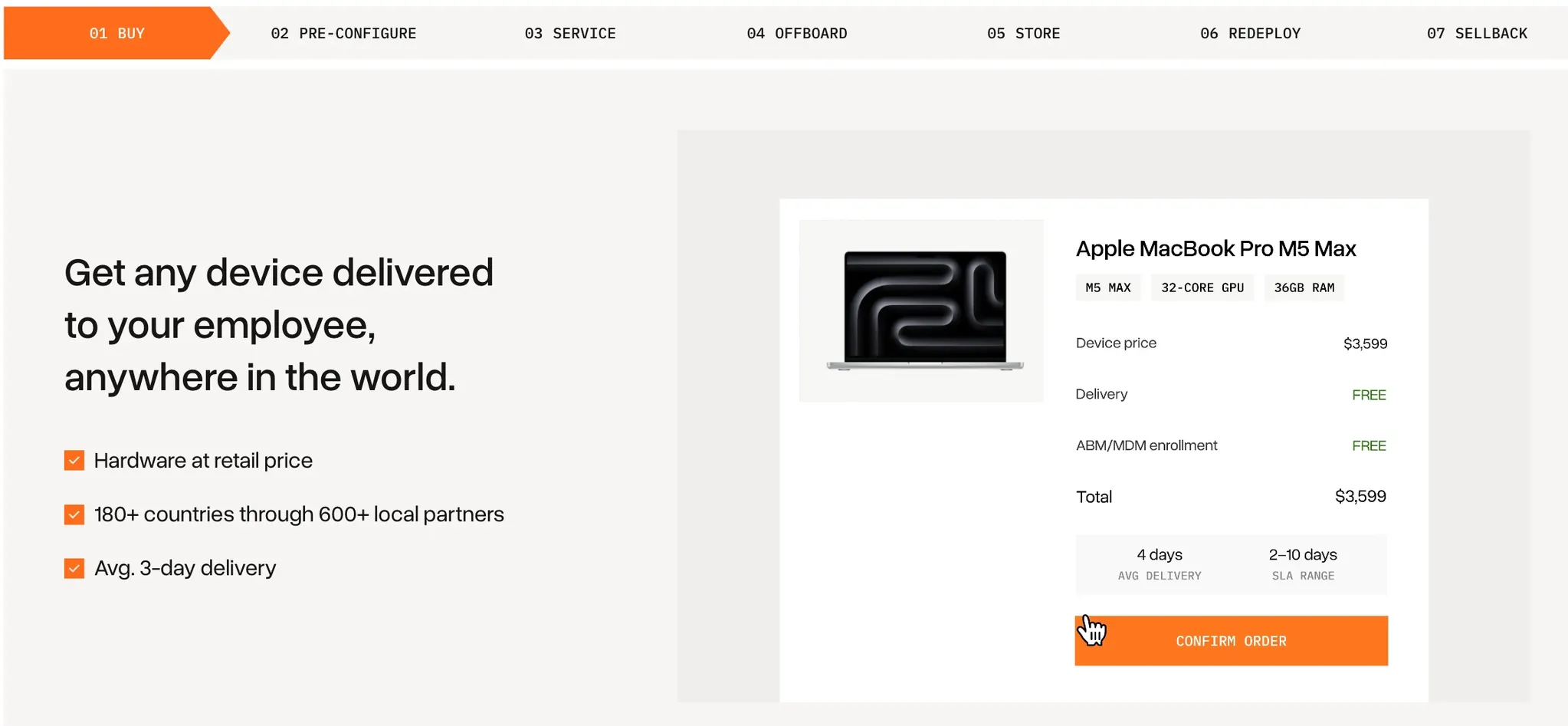
- Retail price, shipping included: the price matches the manufacturer's store in the employee's country, and ABM or Autopilot enrolment adds nothing.
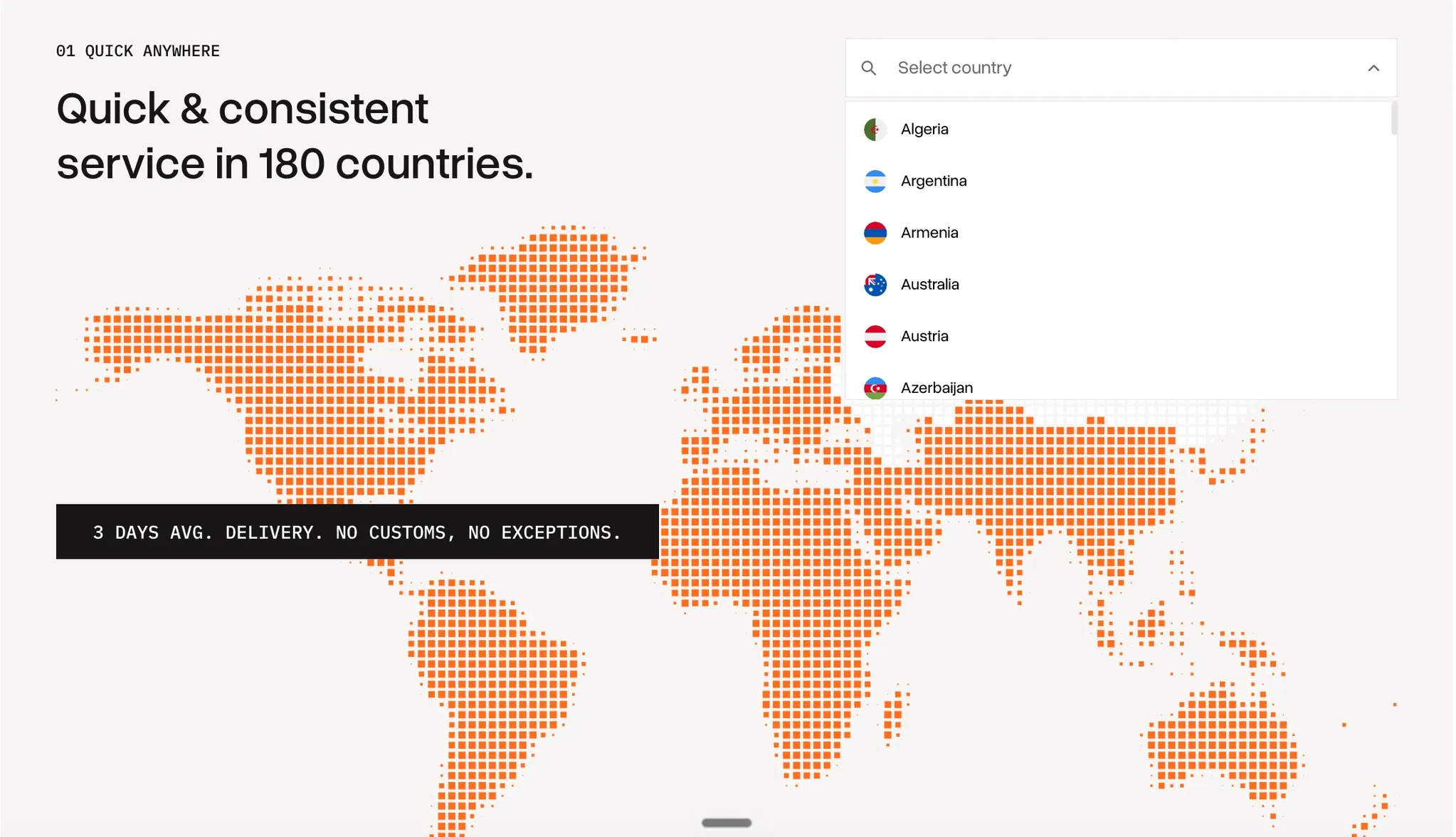
- Bought when you order: 600+ authorised resellers deliver inside 180+ countries, so global laptop procurement needs no stock bought ahead.
- No migration to start: retrieval, storage and redeployment run on the laptops you bought from Workwize, GroWrk or anyone else.
{{cta-primary}}
Price
GroWrk shows no seat price anywhere, and Workwize shows one only on its comparison pages. With both, hardware is billed separately, and buyers of each say that is where the money goes.
Workwize Price
- Seats plus a platform fee: the Basic plan is $8 a seat with a $540 platform fee on top, and Professional is $11 a seat with the same $540, according to pages Workwize publishes comparing itself with rivals. The pricing page itself says "Request Pricing" for all three plans.
- Services have no price list: Workwize lists pickups, storage and repair as included per plan but prices none of them.
- Hardware carries a margin: even a satisfied reviewer notes a "Small price overhead when purchasing through WorkWize" (vendor-invited Capterra review). A team that evaluated Workwize told us it saw "100+ euros markup on MacBooks".
GroWrk Price
- A La Carte is free to join: no platform fee and no contract, terms Tequipy also offers, with a charge for each order. What you give up is the automation: no HR sync, no zero-touch enrolment, no buy-back, no employee dashboard and no named CSM.
- Flex is billed every month whether you order or not: a workstation is a laptop plus its peripherals, and GroWrk's cost calculator says Flex starts from a $449 monthly base plus a tiered per-seat fee. The seat price itself is not published. Vendr, a third-party marketplace, reports a median buyer paying $11,280 a year, an estimate with no team size attached.
- Hardware is the larger line: one current GroWrk customer, buying direct, would pay $1,700 to $1,800 for a MacBook that GroWrk quoted at $2,500 to $2,600. An applied AI director on G2 is gentler: "sometimes they can be a little expensive".
GroWrk's pricing page also carries its own calculator, which sets a sample year at $19,840 on GroWrk against $28,612 on Workwize. It names no team size and comes from GroWrk's marketing, so read it as a claim.
Verdict on Price
Only Workwize can be priced from the outside: $20,880 a year in access fees at 150 users, our estimate. GroWrk can cost less to start, since A La Carte has no platform fee (Tequipy charges none up to 100 devices either), but buyers report the gap in its hardware quotes. A buyer comparing vendors put the problem in six words: "Prices are all over the place". Ask both for the same laptop in the same three countries.
Ease of Use
Workwize Ease of Use
- Plan for a project: G2 puts Workwize's average time to implement at 2 months.
- Stock-outs arrive without warning: a reviewer asks to be "notified about that", because "We usually notice only when we need to make an order" (seller-invited G2 review).
- Some Microsoft features lag: a mid-market reviewer points to "no adoption to fresh Microsoft-backed features like device association - Intune" (seller-invited G2 review).
GroWrk Ease of Use
- Fast to start: A La Carte needs no implementation project.
- The portal still has bugs: the IT operations manager quoted earlier says "The platform is quite buggy", and a global director of IT reports "several bugs in the system before work, which can be disruptive, especially during critical processes like onboarding someone" (May 2026 G2 review).
- Custom builds take setup: an IT manager says "We struggled at first to get their techs to make our builds like we needed them" (October 2025 G2 review), and adds that the builds were quick once documented.
Verdict on Ease of Use
On day one, GroWrk wins: A La Carte has no contract, like Tequipy, and lets you place an order this afternoon. Over a year, Workwize's automation does more work, after a setup that G2 reviewers put at two months. Both portals draw complaints about what they show.
Customer Support
Workwize Support
- Problems are not always flagged: a mid-market reviewer writes, "I would expect that such queries would be known already by Workwize and flagged to us right away" (seller-invited G2 review).
- Replies can stall: a team that evaluated Workwize told us the support team would sometimes "forget to reply for a week".
- The people still get praise: even critical reviewers describe friendly account reps, and a Capterra reviewer says Workwize was "quick to listen and adjust the product and service accordingly" (vendor-invited Capterra review).
GroWrk Support
- Context gets lost: the global director of IT says the support team "sometimes seems to lack context on what is happening with specific customers" (May 2026 G2 review).
- The first months are the hardest: an enterprise analyst writes, "At the beginning, we ran into several issues with support and procurement; however, things have improved since then and are currently much better" (May 2026 G2 review).
- The named team is a Flex feature: the dedicated account manager and CSM, which most positive reviews praise, are not part of A La Carte. GroWrk hired a Customer Success Manager for EMEA in September 2026.
Verdict on Support
GroWrk's support record is stronger on the paid tier. Workwize's complaints are about follow-up rather than people. Ask each who answers on the day a laptop misses a start date.
Integrations
Workwize Integrations
- The longer list: Workwize claims 100+ HRIS integrations, including HiBob, BambooHR, Workday, Personio, Rippling, Gusto and ADP, plus Okta, Entra ID, Jamf and Intune.
- An MCP server since June 2026: AI tools can ship, pick up and store equipment through it. It is live for Enterprise customers, with Pro users getting six months free to explore.
GroWrk Integrations
- More than 40 connections: GroWrk names HiBob, BambooHR, Workday, UKG and Okta for people data, and Intune, Autopilot, Kandji and ABM for devices. GroWrk's homepage now lists its own MCP server.
- All of it is Flex only: the pricing page lists integrations, HRIS sync and zero-touch MDM on the paid tier. On A La Carte, someone on your team enters each hire.
Verdict on Integrations
Workwize wins on integration depth for a team that clears its 150-user gate. GroWrk matches the basics, but only once you sign Flex. Tequipy enrols through ABM and Autopilot, so its zero-touch deployment works with Jamf, Intune, Kandji and JumpCloud.
Stock, Delivery and Coverage
Both vendors are fastest when the laptop already sits in their warehouse. Neither makes it easy to see how much of your order history came from stock.
Workwize Stock and Coverage
- The fast promise has a condition: Workwize's FAQ says, "With equipment that is in stock, we ship orders within one to seven working days". Stock means hardware you bought earlier and placed in one of its 14 warehouses.
- Your plan limits the map: Basic ships to three regions, Professional to five. Workwize itself publishes 100+, 120 and 130+ countries on different pages.
- Couriers are the weak link: a mid-market reviewer says "They operate using 3rd party logistics companies and they tend to be unreliable" (seller-invited G2 review).
GroWrk Stock and Coverage
- On-demand orders fail more often: by GroWrk's own count, 16.9% of orders bought on demand were cancelled, against 4.8% drawn from stock already held. The CEO quoted higher figures the same day, so treat the rate as one in six to one in four.
- The speed claim and the data differ: GroWrk's CEO says "In most countries, we can get a device into an employee's hands in 2 to 5 days" (September 2026 LinkedIn post). The cancellation figures above show how often an on-demand order never arrives at all.
- Not every country is fully switched on: GroWrk's Country Coverage Guide marks three states: full service, "available on request", and not yet available. Ask which state each of your countries is in.
Verdict on Stock and Coverage
Both vendors reward the buyer who keeps stock with them, which suits planned hires and fails the team a buyer described as one that "might hire 30 people in two weeks with only a week's notice from HR". Workwize's region limits apply by plan; GroWrk's apply by country and account.
Pro tip: ask for the stock share before you compare delivery times. Ask both vendors in writing what share of last quarter's orders came from warehouse stock, by country, for your three hardest countries. If the quick deliveries all came from stock, you will have to buy ahead, and that is cash spent before anyone is hired.
Retrieval and Buyback
Of 287 HR workers in Capterra's 2022 offboarding survey, 71% said at least one employee had left without returning company equipment.
Workwize Retrieval
- A published average: Workwize's About page claims a 30-day average global retrieval cycle and resale of up to 45% of a device's original value. Both are company figures.
- Recent pickups drew complaints: a small-business reviewer reports "several situations where no one ever showed up to the pickup several times in a row" (seller-invited G2 review).
GroWrk Retrieval
- Status is hard to follow: an HR manager finds it "challenging to understand where a device is in the retrieval process or the timeline for retrieval" (November 2025 G2 review).
- Buyback prices draw questions: a head of IT support writes, "The buyback pricing process could be more transparent" (June 2026 G2 review), and a long-time customer told us they got "$50 for a buyback" on a four-year-old MacBook Pro.
Verdict on Retrieval
Neither has a clean retrieval record. Ask both for completed pickups in your own countries, and for a written buyback quote on one of your older laptops. You can also hand one leaver's laptop to a laptop retrieval service that accepts hardware from any vendor, and compare the two experiences.
How to Choose a Device Lifecycle Platform
Find the Gate Before the Feature List
Every vendor has a point where the full product opens: a seat count, a paid tier, a contract term. List your headcount, device count and hiring countries, then ask each vendor which plan that puts you on. Tequipy has no such point: its device lifecycle management software is free until device 101.
Count the Stock You Would Have to Buy Ahead
If a vendor's quick deliveries come from stock, ask how many laptops you would need to hold to hit your start dates, and what storing them costs.
Test the Hardest Country First
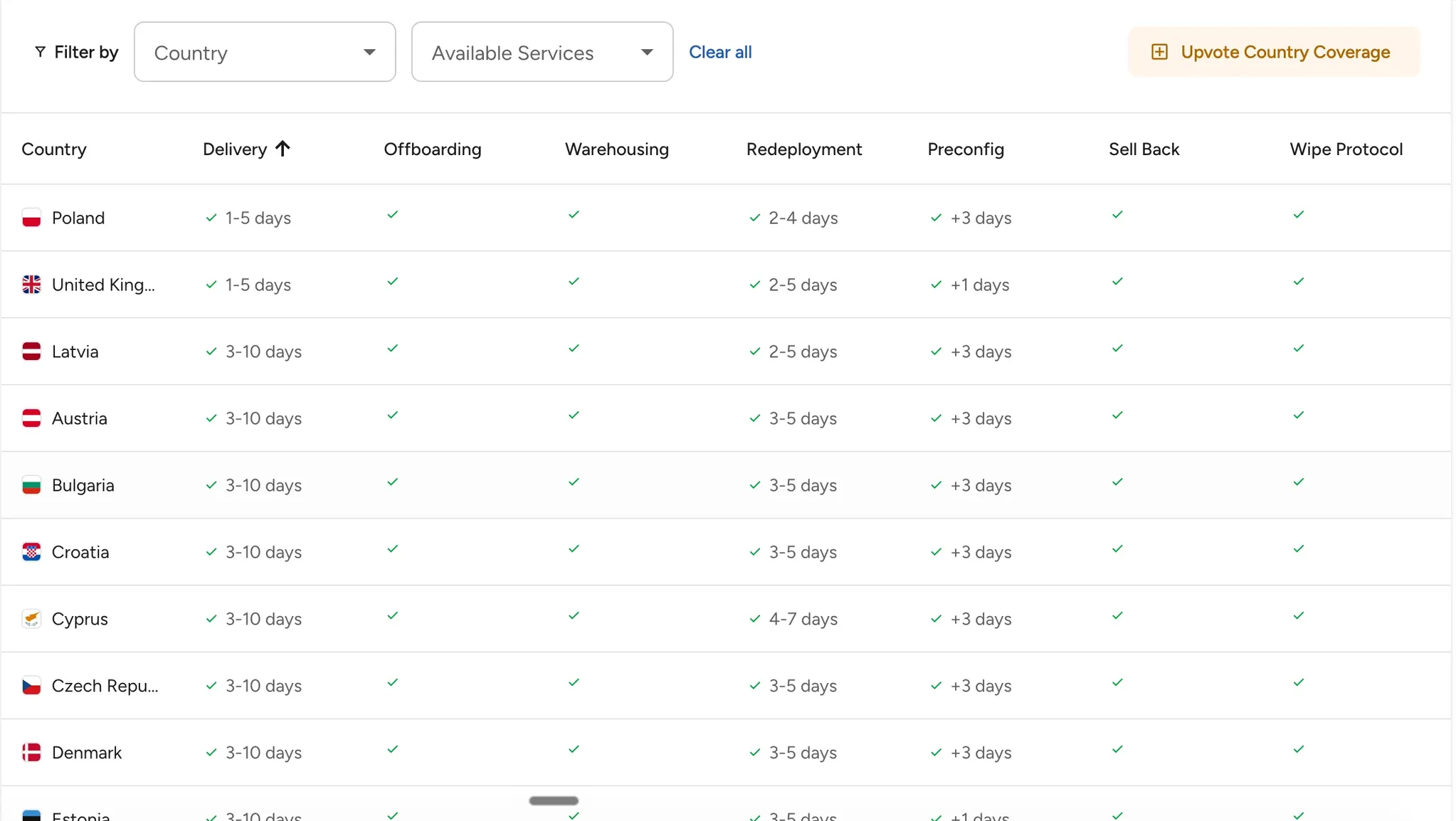
A vendor's map shows where it claims to work. One order shows where it does. Booksy tested Tequipy in Latin America first, a region where it had struggled, and then moved other regions over.
Alternative to Both: Tequipy
Three habits from Revolut's IT team shape the product: buy where the employee lives, enrol the laptop before it ships, and collect it the week someone leaves.
Key Features
Local Sourcing on Demand
A network of 600+ authorised resellers covers 180+ countries, and the one in your hire's country buys the laptop for that order. No stock is held in advance, and nothing crosses a customs border. Delivery takes three business days on average and never more than ten, or the laptop's price goes down.
Devices That Arrive Enrolled
Macs go into your Apple Business Manager and Windows hashes into Autopilot before the laptop ships, at no charge. On first boot it lands in your MDM, and Tequipy never needs a login to Jamf, Intune or Kandji.
Retrieval, Storage, Redeployment and Sellback
Tequipy emails the leaver at a private address and sends a box and label if needed. Collection, wipe and condition check cost $70 to $150. The laptop then waits in storage at $12 a month, goes to the next hire, or is sold through buyback for laptops, with the money paid in cash. None of it requires the laptop to have come from Tequipy.
Tequipy Pricing
| Item | Price |
|---|---|
| Platform | $99 a month flat at any fleet size, free for up to 100 devices |
| Hardware | Recommended retail price, delivery included |
| ABM and Autopilot enrolment | Free |
| Offboarding | $70 to $150 per device |
| Storage | $12 per device per month |
| Redeployment | $70 to $150 per device |
| HRIS sync (optional) | $199 a month |
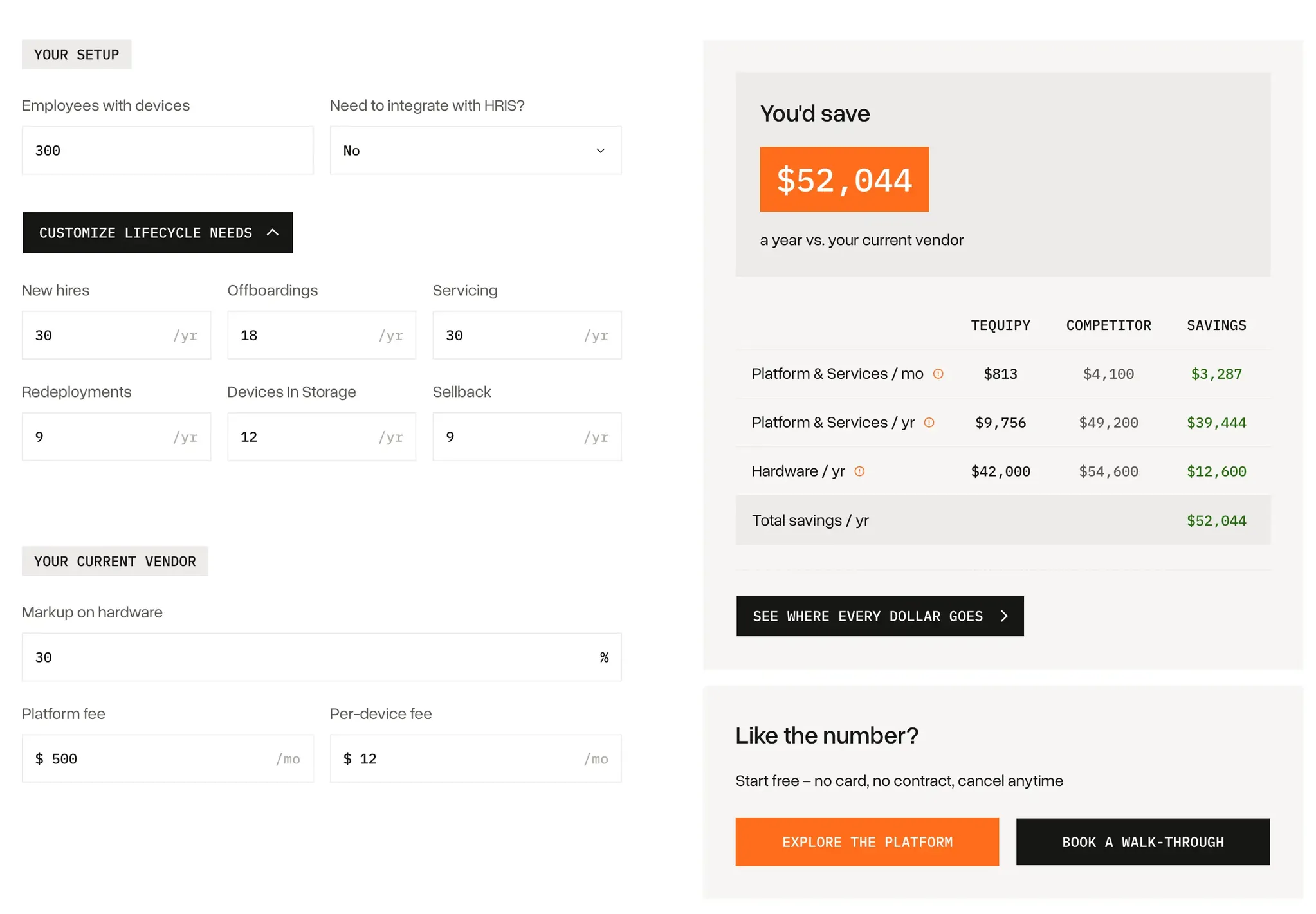
For 150 people, Workwize Basic access fees come to $20,880 a year (our estimate, both fees read as monthly) and Tequipy's platform to $1,188, a $19,692 gap before services; GroWrk's free tier has no platform fee, so its line is hardware. Workwize charges $8 a seat, so every hire adds $96 a year, while Tequipy's $99 a month never grows with headcount. Ten MacBooks at one GroWrk customer's $2,500 to $2,600 quote cost $25,000 to $26,000, against $17,000 to $18,000 on Tequipy, delivery included. HRIS sync is $199 a month. Enter what you pay today and see for yourself.
Where Tequipy Shines
- Retail price is the whole price: Tequipy's margin is the gap between its volume price from resellers and the retail price you pay, plus its service fees.
- Short notice works: a hire announced this week follows the same steps as one planned for months. Connecteam moved to Tequipy after a global vendor's laptops arrived up to two weeks late in Australia, as its case study describes.
- Audit evidence on file: Tequipy is ISO 27001 certified, each handover is signed in a chain of custody, and a Blancco wipe report or destruction certificate is available on request.
Where Tequipy Falls Short
- SOC 2 is not finished: Tequipy holds ISO 27001 and shares penetration test reports. The SOC 2 audit is in progress, so ask for an update on a demo call.
- Three native HRIS integrations: HiBob, BambooHR and Workday. Any other HR tool needs the REST API, though the team will often build the link for you if you ask.
- No leasing: every laptop is bought outright at retail, and Tequipy offers no lease or financing in any country. If you need devices off the balance sheet, look at Workwize, which offers rental.
Tequipy Customer Reviews
On G2, Tequipy has 4.9 from 4 reviews as of October 2026, a sample too small to show a pattern. Lisa Kiseleva, People Operations Specialist at Gigs, which hires across 20 countries, says: "Delivery times, pricing, and service quality remain reliable no matter where we're hiring."
Connecteam's IT manager, Asaf Naor, puts it this way: "The attention to detail and the attention to the SLA is really good" (Connecteam case study).
Who Tequipy Is Best For
- Globally distributed teams: three countries, fifteen, or more, each with the same price list and the same steps.
- First hires abroad: once someone starts in a country with no office, entity or supplier, buying laptops at home and shipping them stops working.
- Teams near a renewal date: a Tequipy order placed before a 12-month Flex term ends needs no setup fee and no contract.
{{cta-primary}}
CONCLUSION
What Will You Choose?
Choose Workwize if you clear its 150-user minimum, want your HR system to place orders, and are ready for a setup of a couple of months. GroWrk is the better pick when your hires are mostly in the Americas and ordering one device at a time is enough; the integrations and the named CSM wait behind a 12-month Flex agreement.
For a team that fits neither gate, send one Tequipy order to the country that gives you the most trouble and hold that invoice next to both quotes. The Tequipy team can set up the account within a day. For a wider field, read about other Workwize alternatives and other GroWrk alternatives.
FAQ
Which Costs Less for 150 People, Workwize or GroWrk?
It depends on how you buy. Workwize's Basic access fees come to $20,880 a year at 150 users if both fees are monthly. GroWrk's A La Carte costs nothing until you order, while Flex adds a per-workstation fee GroWrk does not publish. Hardware quotes decide most of the gap.
Does Workwize or GroWrk Work for a Team Under 100 People?
GroWrk does, through A La Carte, which needs no contract (neither does Tequipy). Workwize's Basic plan needs 150 users, and its FAQ says smaller teams can sometimes benefit if they are fully remote. GroWrk's Flex tier is aimed at companies with more than 100 employees.
Which Security Reports Can Workwize and GroWrk Show a Reviewer?
Workwize can point to a SOC 2 Type II report covering security, availability and confidentiality, and to an ISO 27001 certificate shown in its site footer. GroWrk badges SOC 2 Type 2 and keeps a security page, but names no ISO 27001 certificate and publishes no penetration test detail. Ask both for the report itself under NDA, with its audit period.
What Happens When the Laptop You Order Is Not in Stock?
On Workwize, an unavailable model simply cannot be added to the order, and reviewers say they find out only when they try to order. Its one-to-seven-day shipping applies to stock you bought earlier. On GroWrk, new orders depend on manufacturer lead times, and its own data shows 16.9% of on-demand orders cancelled. Tequipy buys every laptop for its order from a local reseller.
Can You Run Tequipy Next to Workwize or GroWrk Before Switching?
Yes. Tequipy needs no contract, and its retrieval, storage and redeployment work on laptops bought from another vendor. You can send one country's orders to Tequipy while your current contract runs, the way Booksy began with Latin America, then compare the invoices before your renewal date.

Keep your current setup.
Just test us on one order.
AUTHOR
Before Tequipy, Tomek ran IT at Revolut, scaling from 100 employees in 2 offices to 5,000 across 17. He built the system that kept every laptop accounted for, then founded Tequipy – a platform that handles IT equipment logistics for distributed teams across 180+ countries.
As CEO, he runs operations and covers the founder layer: strategy, product, and the company-building that comes with both.
15 minutes. Your countries, your devices, your setup. No pitch.